# Phone SysDial Directory

# Overview

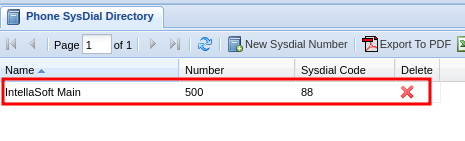
The **Phone SysDial Directory** is a mapping of "Short Codes" to full phone numbers. Shortcodes are useful for quickly dialing commonly used external phone numbers.

<p class="callout info">A shortcode is a shorter number that can be dialed to reach a full number. Think of them as abbreviations for phone numbers.</p>

<div class="wiki-content" id="bkmrk-overview-adding-a-ph"><div class="contentLayout2"><div class="columnLayout single" data-layout="single"><div class="cell normal" data-type="normal"><div class="innerCell"><div class="panel conf-macro output-block" data-hasbody="true" data-macro-name="panel" style="border-width: 1px;"><div class="panelContent"><div class="toc-macro client-side-toc-macro conf-macro output-block" data-csslistindent="15px" data-hasbody="false" data-headerelements="H1,H2" data-macro-name="toc" data-numberedoutline="true">- <span class="toc-item-body" data-outline="2">[Adding a Phone SysDial "Short Code"](#bkmrk-adding-a-phone-sysdi)</span>
- <span class="toc-item-body" data-outline="3">[Removing a "Short Code"](#bkmrk-removing-a-%22short-co)</span>

</div></div></div></div></div></div></div></div>## Adding a Phone SysDial "Short Code"

1\) Navigate to the **Phone SysDial Directory** via the **Navigation Panel.**

2\) Click the **New Sysdial Number** button.

[![image.png](https://public.intellasoft.net/uploads/images/gallery/2024-07/scaled-1680-/t4Qimage.png)](https://public.intellasoft.net/uploads/images/gallery/2024-07/t4Qimage.png)

 2) Enter the **Name** of the short code. This should be relevant to whom the number is associated with.

3\) Next enter the **Number** that the shortcode should dial. This can be an internal **Extension**, or it can be an outside phone number.

4\) Lastly enter a number for the shortcode in the box **Sysdial Code.** This is the number the user will dial when attempting to call the full **Number** associated with the shortcode.

[![image.png](https://public.intellasoft.net/uploads/images/gallery/2024-07/scaled-1680-/4GBimage.png)](https://public.intellasoft.net/uploads/images/gallery/2024-07/4GBimage.png)

5\) When you are satisfied with your selection, click **Save New SysDial Code.** If you saved you will see a message stating **Changes saved.** The final results will look similar to the one below.

<p class="callout info">If you enter a 10-digit external phone number, it will automatically format the phone number to include the area code in parentheses followed by the local number.</p>

[![phone-sysdial1.png](https://public.intellasoft.net/uploads/images/gallery/2024-08/phone-sysdial1.png)](https://public.intellasoft.net/uploads/images/gallery/2024-07/12nimage.png)

## Removing a "Short Code"

1\) Navigate to the **Phone SysDial Directory** via the **Navigation Panel.**

2\) Find the **SysDial Number** (short code) you wish to delete

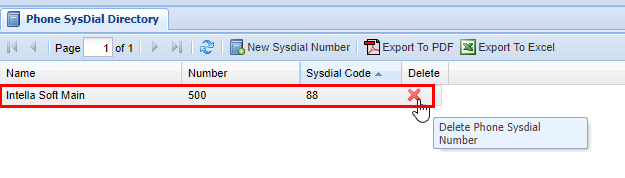
3\) Click the red **X** under the **Delete** column.

4\) A confirmation pop-up will appear confirming your selection. If you wish to delete click **OK.** You will see a message stating **Changes Saved.** If this is not the entry to wish to delete click **Cancel.**

[![image.png](https://public.intellasoft.net/uploads/images/gallery/2024-07/scaled-1680-/0zzimage.png)](https://public.intellasoft.net/uploads/images/gallery/2024-07/0zzimage.png)