# Hunt Group Members

## Overview

A **Hunt Group** is a way to ring a group of phones, either in sequence or in parallel.

<div class="wiki-content" id="bkmrk-1overview-2hunt-grou"><div class="contentLayout2"><div class="columnLayout single" data-layout="single"><div class="cell normal" data-type="normal"><div class="innerCell"><div class="panel conf-macro output-block" data-hasbody="true" data-macro-name="panel" style="border-width: 1px;"><div class="panelContent"><div class="toc-macro client-side-toc-macro conf-macro output-block" data-csslistindent="15px" data-hasbody="false" data-headerelements="H1,H2" data-macro-name="toc" data-numberedoutline="true">- <span class="toc-item-body" data-outline="2">[Hunt Group Selection](#bkmrk-hunt-group-selection)</span>
- <span class="toc-item-body" data-outline="3">[Adding a New Hunt Group](#bkmrk-adding-a-new-hunt-gr)</span>
- <span class="toc-item-body" data-outline="4">[Enabling/Disabling Hunt Group Members](#bkmrk-enabling%2Fdisabling-h)</span>
- <span class="toc-item-body" data-outline="5">[Removing Hunt Group Members](#bkmrk-removing-hunt-group-)</span>

</div></div></div></div></div></div></div></div>## Hunt Group Selection

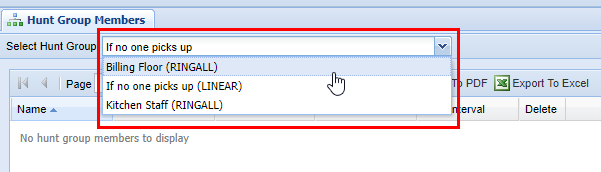
Before adding Hunt Group Members, you must first choose the hunt group to modify from the dropdown in the top left of the screen.

<p class="callout info">Tip: If the Hunt Groups were updated and are not visible in the list, reload the list by picking any group and pressing refresh or by navigating to a different screen and back again.</p>

[![image.png](https://public.intellasoft.net/uploads/images/gallery/2024-07/scaled-1680-/MFnimage.png)](https://public.intellasoft.net/uploads/images/gallery/2024-07/MFnimage.png)

## Adding a New Hunt Group

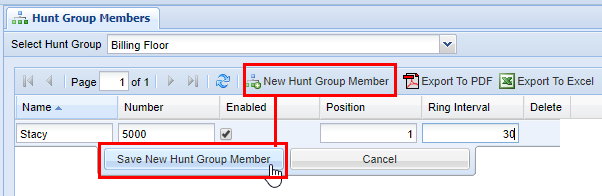
1\) After choosing a Hunt Group, click the **New Hunt Group Member** button and fill out the row.

<p class="callout info">Tip: Unlimited members are supported.</p>

[![image.png](https://public.intellasoft.net/uploads/images/gallery/2024-07/scaled-1680-/kqCimage.png)](https://public.intellasoft.net/uploads/images/gallery/2024-07/kqCimage.png)

<div class="wiki-content" id="bkmrk-name-%28required%29-the-"><div class="contentLayout2"><div class="columnLayout single" data-layout="single"><div class="cell normal" data-type="normal"><div class="innerCell"><div class="panel conf-macro output-block" data-hasbody="true" data-macro-name="panel" style="border-width: 1px;"><div class="panelContent"><div class="sectionColumnWrapper conf-macro output-block" data-hasbody="true" data-macro-name="section"><div class="sectionMacro"><div class="sectionMacroRow"><div class="columnMacro conf-macro output-block" data-hasbody="true" data-macro-name="column" style="width: 606px; min-width: 606px; max-width: 606px;"><div class="confluence-information-macro confluence-information-macro-information conf-macro output-block" data-hasbody="true" data-macro-name="info"><div class="confluence-information-macro-body">  
</div></div></div></div></div></div><div class="sectionColumnWrapper conf-macro output-block" data-hasbody="true" data-macro-name="section"><div class="sectionMacro"><div class="sectionMacroRow"><div class="columnMacro conf-macro output-block" data-hasbody="true" data-macro-name="column"><div class="table-wrap"><table border="1" class="confluenceTable" style="width: 100%; border-collapse: collapse; border-style: solid; height: 296.4px;"><colgroup><col style="width: 18.0491%;"></col><col style="width: 81.9509%;"></col></colgroup><thead><tr style="height: 35.4px;"><td style="height: 35.4px;">**Property**

</td><td style="height: 35.4px;">Description  
</td></tr></thead><tbody><tr style="height: 35.4px;"><td class="confluenceTd" style="height: 35.4px;">**Name** (Required)

</td><td class="confluenceTd" style="height: 35.4px;">The descriptive name of the number to ring.</td></tr><tr style="height: 35.4px;"><td class="confluenceTd" style="height: 35.4px;">**Number** (Required)

</td><td class="confluenceTd" style="height: 35.4px;">The number to ring, which can be any valid extension or 10 digit number.</td></tr><tr style="height: 29.8px;"><td class="confluenceTd" style="height: 29.8px;">**Enabled**</td><td class="confluenceTd" style="height: 29.8px;">Whether or not the number will be active within the Hunt Group.</td></tr><tr style="height: 80.2px;"><td class="confluenceTd" style="height: 80.2px;">**Position**</td><td class="confluenceTd" style="height: 80.2px;">Only valid for [LINEAR](https://public.intellasoft.net/books/web-portal-dL9/page/hunt-groups#bkmrk-hunt-group-types) type. Each number will ring for **Ring Interval** seconds. If not picked up, the call will proceed with ringing the next number from smallest to largest in the position sequence until there are no more numbers to call. At that point, the call will be sent to the [Unavailable Destination](https://public.intellasoft.net/books/web-portal-dL9/page/hunt-groups#bkmrk-hunt-group-types)

</td></tr><tr style="height: 80.2px;"><td class="confluenceTd" style="height: 80.2px;">**Ring Interval**

(Required)

</td><td class="confluenceTd" style="height: 80.2px;">For a [LINEAR](https://public.intellasoft.net/books/web-portal-dL9/page/hunt-groups#bkmrk-hunt-group-types) type, the number of seconds the call will ring.

For a [RINGALL](https://public.intellasoft.net/books/web-portal-dL9/page/hunt-groups#bkmrk-hunt-group-types) type, all enabled numbers will ring simultaneously for the set number of seconds. If not picked up, the call will be sent to the [Unavailable Destination](https://public.intellasoft.net/books/web-portal-dL9/page/hunt-groups#bkmrk-hunt-group-types)

</td></tr><tr><td>**Ring Interval Retry**

</td><td>If (And only if) this is non-zero, 'Ring Interval' becomes the sub-interval, and we'll ring up till 'Ring Retry Interval' seconds total..  
Example: Ring Interval: 10 / Ring Retry Interval: 60 -- Ring 10 seconds each, for 60 seconds max

</td></tr></tbody></table>

</div></div></div></div></div></div></div></div></div></div></div></div>## Enabling/Disabling Hunt Group Members

To disable/enable a hunt group member, double-click on the member's row and disable/enable the checkbox under "Enabled".

Disabling a Hunt Group Member is useful when one or more members may become unavailable or just not necessary to ring them for a certain period. When the member becomes available again, edit the record to set it back to Enabled.

[![image.png](https://public.intellasoft.net/uploads/images/gallery/2024-07/scaled-1680-/qe1image.png)](https://public.intellasoft.net/uploads/images/gallery/2024-07/qe1image.png)

## Removing Hunt Group Members

1\) Click on the red **X,** next to the member's name

2\) In the dialog, click **OK** to delete.

[![image.png](https://public.intellasoft.net/uploads/images/gallery/2024-07/scaled-1680-/taAimage.png)](https://public.intellasoft.net/uploads/images/gallery/2024-07/taAimage.png)

**<span class="confluence-embedded-file-wrapper confluence-embedded-manual-size">![](https://public.intellasoft.net/download/attachments/8029626/image2017-7-14_13-25-53.png?version=1&modificationDate=1500053153252&api=v2)</span>**