# Departments

On the Departments screen, you can associate **Users** with **Departments**. On other screens, you can quickly add all **Users** in a **Department** to a list, making updating permissions much faster, especially for large **Departments**.

<div class="wiki-content" id="bkmrk-1overview-2adding-a-"><div class="contentLayout2"><div class="columnLayout single" data-layout="single"><div class="cell normal" data-type="normal"><div class="innerCell"><div class="panel conf-macro output-block" data-hasbody="true" data-macro-name="panel" style="border-width: 1px;"><div class="panelContent"><div class="toc-macro client-side-toc-macro conf-macro output-block" data-csslistindent="15px" data-hasbody="false" data-headerelements="H1,H2" data-macro-name="toc" data-numberedoutline="true">- <span class="toc-item-body" data-outline="2">[Adding a New Department](#bkmrk-adding-a-new-departm)</span>
- <span class="toc-item-body" data-outline="3">[Department Hierarchy](#bkmrk-department-hierarchy)</span>
- <span class="toc-item-body" data-outline="4">[Deleting a Department](#bkmrk-deleting-a-departmen)</span>

</div></div></div></div></div></div></div></div>## Adding a New Department

1\) Start by navigating to the **Departments** screen from the **Navigation Panel.**

2\) Click the **New Department** button and enter a name for the department.

3\) If you are creating a **Department** under another **Department,** effectively creating a [**Department Hierarchy**](#bkmrk-department-hierarchy)) select one from the drop-down under **Department Parent Name**.

4\) When you are finished, click **Save New Department.** After you click save you will see a message stating **Changes Saved**.

[![image.png](https://public.intellasoft.net/uploads/images/gallery/2024-07/scaled-1680-/LPAimage.png)](https://public.intellasoft.net/uploads/images/gallery/2024-07/LPAimage.png)

## Department Hierarchy

As stated above you can have **Departments** within **Departments.**

1\) Start by navigating to the **Departments** screen via the **Navigation Panel.**

2\) Create a new department, following the steps above, then click the drop-down menu labeled **Department Parent Name**, and select a **Department** to place the department under.

[![image.png](https://public.intellasoft.net/uploads/images/gallery/2024-07/scaled-1680-/ntBimage.png)](https://public.intellasoft.net/uploads/images/gallery/2024-07/ntBimage.png)

3\) When you are finished save the **Department** by clicking on the **Save New Department** button, afterwards you will see a message stating **Changes Saved.**

[![image.png](https://public.intellasoft.net/uploads/images/gallery/2024-07/scaled-1680-/1Fhimage.png)](https://public.intellasoft.net/uploads/images/gallery/2024-07/1Fhimage.png)

## Deleting a Department

1\) Navigate to the **Departments** screen via the **Navigation Panel**.

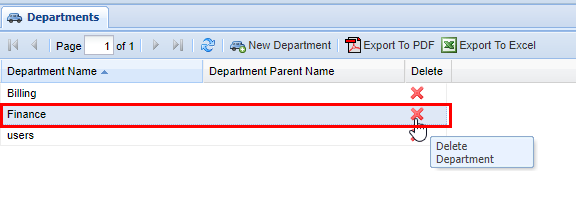
2\) Find the **Department** you want to delete and click the red **X** in the **Delete** column. A confirmation pop-up will appear confirming your selection. If you wish to delete, click **OK.** You will see a message stating **Changes Saved**, if this is not the entry to wish to delete click **Cancel**.

<p class="callout info">Note: To remove a **Department,** you will also need to delete any users assigned to the department or reassign the **Users** department to another department.</p>

[![image.png](https://public.intellasoft.net/uploads/images/gallery/2024-07/scaled-1680-/Jtiimage.png)](https://public.intellasoft.net/uploads/images/gallery/2024-07/Jtiimage.png)

3\) If you see an error such as the one below when attempting to remove a **Department** this means that there is still a **User** that is associated with a **Department.** To remove a **Department,** you will also need to delete any users assigned to the department or reassign the **Users** department to another department.

[![image.png](https://public.intellasoft.net/uploads/images/gallery/2024-07/scaled-1680-/bJEimage.png)](https://public.intellasoft.net/uploads/images/gallery/2024-07/bJEimage.png)
<span class="confluence-embedded-file-wrapper confluence-embedded-manual-size">![](https://public.intellasoft.net/download/attachments/8029534/image2017-6-30_14-59-23.png?version=1&modificationDate=1499971305080&api=v2)</span>
