# IntellaQueue

# Agent Editor

## Overview

The **Agent Editor** screen is for adding and managing login credentials for Agents. An Agent is a special account on the system specifically for IntellaQueue tracking and usage.

<p class="callout info">Each Agent requires an available license in order to be created.</p>

<p class="callout info">Even though Agent logins are not bound to a particular device or extension, the device that they use must be set to allow agent logins for IntellaQueue, or they will be disallowed from doing so even with a proper agent license.</p>

## Adding a New Agent

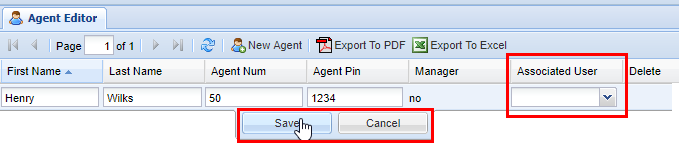
1\) Click the **New Agent** button and fill out the various fields for the Agent:

- Keep in mind Agent Num and (optional) Agent Pin are number-only fields
- The **Associated User** field will list all of the users available 
    - Multiple Agents can be associated with the same user if that Agent has multiple phones
    - As part of the **\[development road map: new Agent Device handling\]** will take care of Agents that have multiple phones to no longer need multiple Agent logins.

<div class="columnLayout single" data-layout="single" id="bkmrk-"><div class="cell normal" data-type="normal"><div class="innerCell"><div class="panel conf-macro output-block" data-hasbody="true" data-macro-name="panel" style="border-width: 1px;"><div class="panelContent"><div class="sectionColumnWrapper conf-macro output-block" data-hasbody="true" data-macro-name="section"><div class="sectionMacro"><div class="sectionMacroRow"></div></div></div></div></div></div></div></div>[![image.png](https://public.intellasoft.net/uploads/images/gallery/2024-07/scaled-1680-/6W3image.png)](https://public.intellasoft.net/uploads/images/gallery/2024-07/6W3image.png)

<table border="1" id="bkmrk-field-type-descripti" style="border-collapse: collapse; width: 100%;"><colgroup><col style="width: 12.7318%;"></col><col style="width: 14.3387%;"></col><col style="width: 11.2936%;"></col><col style="width: 61.5123%;"></col></colgroup><thead><tr><td>  
</td><td>**Field**  
</td><td>**Type**  
</td><td>**Description**  
</td></tr></thead><tbody><tr><td class="confluenceTd">**Required**</td><td class="confluenceTd">First Name</td><td class="confluenceTd">Text</td><td class="confluenceTd">For new Agent</td></tr><tr><td class="confluenceTd">  
</td><td class="confluenceTd">Last Name</td><td class="confluenceTd">Text</td><td class="confluenceTd">For new Agent</td></tr><tr><td class="confluenceTd">  
</td><td class="confluenceTd">Agent Num</td><td class="confluenceTd">Numeric</td><td class="confluenceTd">Number that the Agent will be using to login</td></tr><tr><td class="confluenceTd">**Optional**</td><td class="confluenceTd">Pin</td><td class="confluenceTd">Numeric</td><td class="confluenceTd">Security pin for Agent login, recommended to prevent people logging in using the wrong agent number</td></tr><tr><td class="confluenceTd">  
</td><td class="confluenceTd">Associated User</td><td class="confluenceTd">List</td><td class="confluenceTd">The Agent's own web portal user account. This is used for reporting purposes and only if Agents are not hot-desking

- All of the calls the extension has made/received while the Agent was not logged in will be known

</td></tr><tr><td class="confluenceTd">**View Only**</td><td class="confluenceTd">Manager</td><td class="confluenceTd">Boolean</td><td class="confluenceTd">If Yes, then the **\[Agent Toolbar\]** has extended capabilities including:

- Live call monitoring
- Controlling Agent status
- Setting **\[Manager Only Statuses\]** on Agents

Use the **\[License Manager\]** to set which Agents have Manager status.

</td></tr></tbody></table>

<div class="wiki-content" id="bkmrk--2"><div class="contentLayout2"><div class="columnLayout single" data-layout="single"><div class="cell normal" data-type="normal"><div class="innerCell"><div class="panel conf-macro output-block" data-hasbody="true" data-macro-name="panel" style="border-width: 1px;"><div class="panelContent"><div class="sectionColumnWrapper conf-macro output-block" data-hasbody="true" data-macro-name="section"><div class="sectionMacro"><div class="sectionMacroRow"></div></div></div></div></div></div></div></div></div></div>2\) Next select an **Agent Num** and an **Agent Pin** (optional).

[![image.png](https://public.intellasoft.net/uploads/images/gallery/2024-07/scaled-1680-/oI8image.png)](https://public.intellasoft.net/uploads/images/gallery/2024-07/oI8image.png)
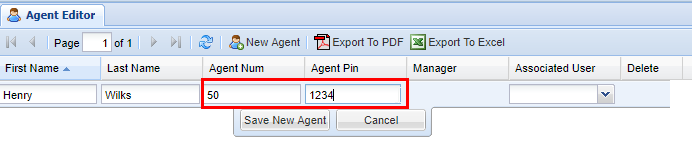
3\) Lastly, you can associate a user account with the Agent.

4\) Click the **Save** button. After you click save, you will see a message stating **Changes Saved**.

[![image.png](https://public.intellasoft.net/uploads/images/gallery/2024-07/scaled-1680-/plUimage.png)](https://public.intellasoft.net/uploads/images/gallery/2024-07/plUimage.png)
## Deleting an Agent

1\) Navigate to <span style="font-size: 14.0px;">the</span> **Agent Editor** screen via the **Navigation Panel**.

2\) Find the Agent<span style="font-size: 14.0px;"> you wish</span> to delete, highlight it by clicking on it, and then click the red **X** under the **Delete** column.

3\) A confirmation pop-up will appear confirming your selection. Click **OK** to confirm. You will see a message stating **Changes Saved**.

[![image.png](https://public.intellasoft.net/uploads/images/gallery/2024-07/scaled-1680-/IPpimage.png)](https://public.intellasoft.net/uploads/images/gallery/2024-07/IPpimage.png)

# Agent Assignments

## Overview

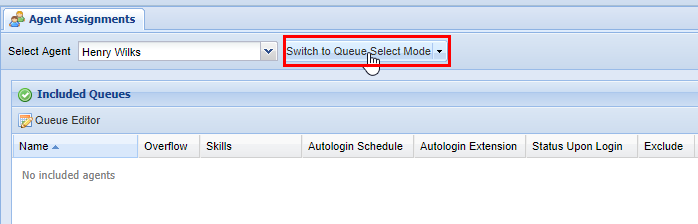
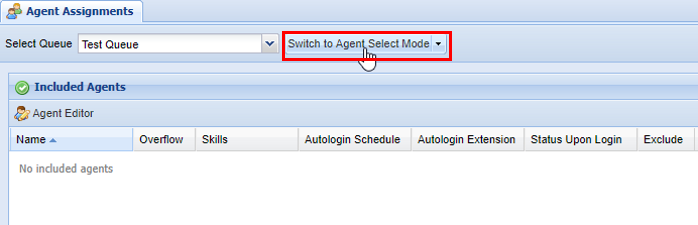
The **Agent Assignments** screen is dedicated to assigning Agents to specific Queues. There are two different modes to consider when using this screen. **Queue Select Mode** and **Agent Select Mode**, which you can access via a button at the top left hand of the **Agent Assignments** screen as pictured below.

**In Agent Selection Mode:**

[![image.png](https://public.intellasoft.net/uploads/images/gallery/2024-07/scaled-1680-/aHtimage.png)](https://public.intellasoft.net/uploads/images/gallery/2024-07/aHtimage.png)
**In Queue Selection Mode:**

[![image.png](https://public.intellasoft.net/uploads/images/gallery/2024-07/scaled-1680-/BEuimage.png)](https://public.intellasoft.net/uploads/images/gallery/2024-07/BEuimage.png)<span class="confluence-embedded-file-wrapper confluence-embedded-manual-size">![](https://public.intellasoft.net/download/attachments/8029970/image2017-8-3_14-39-28.png?version=1&modificationDate=1501785568052&api=v2)</span>
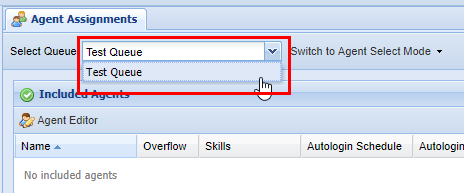
Regardless of which mode you are in, it is important to ensure that you have the correct Agent or Queue selected before making changes. This can be accessed from the drop-down at the top right-hand of the screen to the left on the mode selection button. In the example below, we are selecting a Queue to add Agents to while in **Queue Selection Mode.** It works vice versa if you are in **Agent Selection Mode** (you are selecting an Agent to add Queues to).

[![image.png](https://public.intellasoft.net/uploads/images/gallery/2024-07/scaled-1680-/hFGimage.png)](https://public.intellasoft.net/uploads/images/gallery/2024-07/hFGimage.png)
## Configuring Agents while in Queue Selection Mode

1\) Start by navigating to the **Agent Assignments** <span style="font-size: 14.0px;">screen via the </span>**Navigation Panel.**

<span style="font-size: 14.0px;">2) Then ensure you have selected the correct mode and the proper Queue</span> <span style="font-size: 14.0px;">from the drop-down. </span>

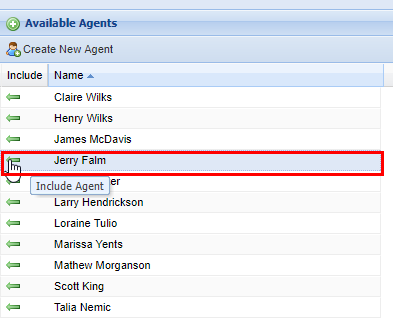
<span style="font-size: 14.0px;">3) To add Agents</span><span style="font-size: 14.0px;">, </span><span style="font-size: 14.0px;">click the green arrows under the </span>**Include** <span style="font-size: 14.0px;">column for each Agent</span> <span style="font-size: 14.0px;">you wish to add.</span><span style="font-size: 14.0px;"> As you include each Agent, they will be moved to the </span>**Included Agents** <span style="font-size: 14.0px;">panel. </span>

[![image.png](https://public.intellasoft.net/uploads/images/gallery/2024-07/scaled-1680-/9KMimage.png)](https://public.intellasoft.net/uploads/images/gallery/2024-07/9KMimage.png)

[![image.png](https://public.intellasoft.net/uploads/images/gallery/2024-07/scaled-1680-/aKGimage.png)](https://public.intellasoft.net/uploads/images/gallery/2024-07/aKGimage.png)
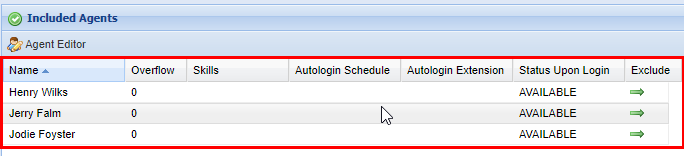
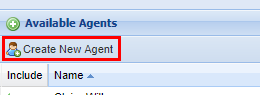
<p class="callout info">If you need to add additional agents, you can click the **Create New Agent** button above the **Available Agents** panel. This will immediately take you to the **[Agent Editor](https://public.intellasoft.net/books/intellaqueue-nQF/page/agent-editor)** screen.  
[![image.png](https://public.intellasoft.net/uploads/images/gallery/2024-07/scaled-1680-/Jikimage.png)](https://public.intellasoft.net/uploads/images/gallery/2024-07/Jikimage.png)</p>
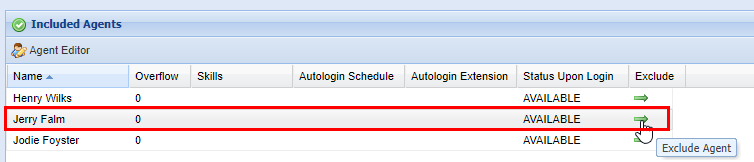
4\) To remove Agents from a Queue click the green arrows under the **Exclude** column from the **Included Agents** panel for each Agent you wish to exclude.

[![image.png](https://public.intellasoft.net/uploads/images/gallery/2024-07/scaled-1680-/xw3image.png)](https://public.intellasoft.net/uploads/images/gallery/2024-07/xw3image.png)
## Configuring Agents while in Agent Selection Mode

1\) Start by navigating to the **Agent Assignments** screen via the **Navigation Panel.**

2\) Ensure you selected the correct **mode** and the proper Agent from the drop-down.

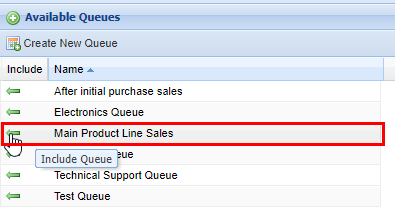
3\) To add Queues to the agent<span style="font-size: 14.0px;">, </span>click the green arrows under the **Include** column for each Queue you wish to add (see the image below). As you include each Queue, they will be moved to the **Included Queues** panel.

<p class="callout info"> </p>

[![image.png](https://public.intellasoft.net/uploads/images/gallery/2024-07/scaled-1680-/VTXimage.png)](https://public.intellasoft.net/uploads/images/gallery/2024-07/VTXimage.png)

[![image.png](https://public.intellasoft.net/uploads/images/gallery/2024-07/scaled-1680-/ayDimage.png)](https://public.intellasoft.net/uploads/images/gallery/2024-07/ayDimage.png)
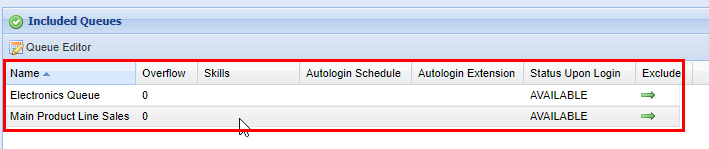
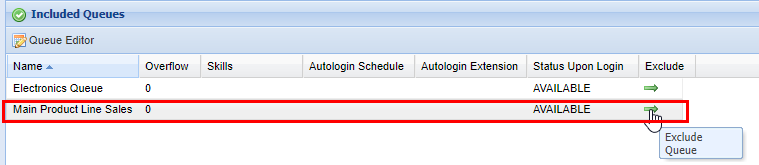
4\) To exclude Queues from an Agent, click the green arrows under the **Exclude** column from the **Included Queue** panel for each Queue you wish to exclude.

[![image.png](https://public.intellasoft.net/uploads/images/gallery/2024-07/scaled-1680-/LgNimage.png)](https://public.intellasoft.net/uploads/images/gallery/2024-07/LgNimage.png)
# Agent Assignments Schedule

## Overview

This screen is dedicated to assigning specific schedules to Agents, whether it be on a temporary or permanent basis.

Often this feature is used to assign Agents to specific Queues during times when other people who are normally staffed to that Queue are unavailable.

<p class="callout info">Note: An Agent must log in before the schedule change becomes active.</p>

<div class="columnLayout single" data-layout="single" id="bkmrk-example-1%3A-the-main-"><div class="cell normal" data-type="normal"><div class="innerCell"><div class="panel conf-macro output-block" data-hasbody="true" data-macro-name="panel" style="border-width: 1px;"><div class="panelContent">- **Example 1**: The main sales team takes a lunch every day from 12:00-1:00 PM. An Agent (or multiple Agents) is assigned to this Queue to help with potential sales calls while the normally staffed Agents are out at lunch. This would be an example of a recurring semi-permanent schedule
- **Example 2**: On a particular day there is going to be a 2-hour meeting with the Installation team between 2:00-4:00 PM, so a temporary schedule is assigned to a specified number of Agents to field these calls during this meeting. When the meeting is over, the schedule will be deleted.

</div></div></div></div></div>## Adding an Agent Assignments Schedule

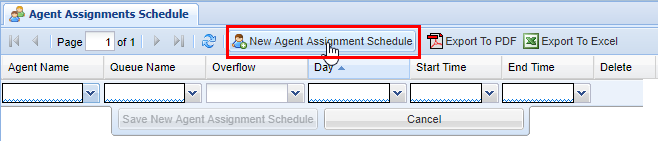
1\) Navigate to the **Agent Assignments Schedule** screen from the **Navigation Panel.** Click the **New Agent Assignment Schedule.**

[![image.png](https://public.intellasoft.net/uploads/images/gallery/2024-07/scaled-1680-/lglimage.png)](https://public.intellasoft.net/uploads/images/gallery/2024-07/lglimage.png)
<table border="1" id="bkmrk-name-type-descriptio" style="border-collapse: collapse; width: 100%;"><colgroup><col style="width: 11.7429%;"></col><col style="width: 14.8331%;"></col><col style="width: 8.57819%;"></col><col style="width: 64.7222%;"></col></colgroup><thead><tr><td>  
</td><td>Name  
</td><td>Type  
</td><td>Description  
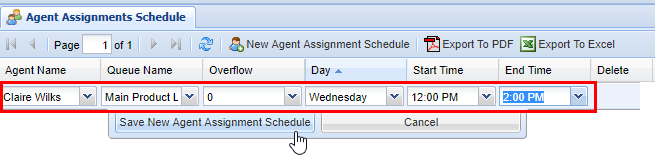
</td></tr></thead><tbody><tr><td class="confluenceTd">**Required**</td><td class="confluenceTd">Agent Name</td><td class="confluenceTd">List</td><td class="confluenceTd">For preexisting Agent</td></tr><tr><td class="confluenceTd">  
</td><td class="confluenceTd">Queue Name</td><td class="confluenceTd">List</td><td class="confluenceTd">For Preexisting Queue</td></tr><tr><td class="confluenceTd">  
</td><td class="confluenceTd">Day</td><td class="confluenceTd">List</td><td class="confluenceTd">Day of Week</td></tr><tr><td class="confluenceTd">  
</td><td class="confluenceTd">Start Time</td><td class="confluenceTd">List</td><td class="confluenceTd">Start Time (24 hour clock)</td></tr><tr><td class="confluenceTd">  
</td><td class="confluenceTd">End</td><td class="confluenceTd">List</td><td class="confluenceTd">End Time (24 hour clock)</td></tr><tr><td class="confluenceTd">**Optional**</td><td class="confluenceTd">Overflow</td><td class="confluenceTd">List</td><td class="confluenceTd">Priority</td></tr></tbody></table>

<div class="wiki-content" id="bkmrk-required-agent-name-"><div class="contentLayout2"><div class="columnLayout single" data-layout="single"><div class="cell normal" data-type="normal"><div class="innerCell"><div class="panel conf-macro output-block" data-hasbody="true" data-macro-name="panel" style="border-width: 1px;"><div class="panelContent"><div class="sectionColumnWrapper conf-macro output-block" data-hasbody="true" data-macro-name="section"><div class="sectionMacro"><div class="sectionMacroRow"><div class="columnMacro conf-macro output-block" data-hasbody="true" data-macro-name="column" style="width: 50%; min-width: 50%; max-width: 50%;"><div class="table-wrap"></div></div></div></div></div></div></div></div></div></div></div></div>2\) Next choose an **Agent Name, Queue Name, Day, Start Time,** and **End Time** for the **Schedule. Overflow** is optional but is useful if you have multiple Queue assignments in place.

[![image.png](https://public.intellasoft.net/uploads/images/gallery/2024-07/scaled-1680-/OKDimage.png)](https://public.intellasoft.net/uploads/images/gallery/2024-07/OKDimage.png)
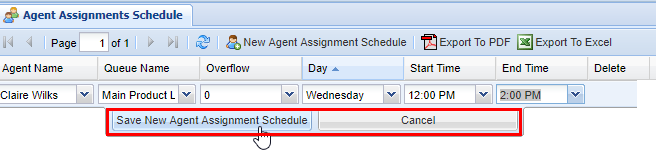
3\) Click the **Save New Agent Assignment Schedule** button. After you click save, you will see a message stating **Changes Saved**.

[![image.png](https://public.intellasoft.net/uploads/images/gallery/2024-07/scaled-1680-/k9uimage.png)](https://public.intellasoft.net/uploads/images/gallery/2024-07/k9uimage.png)
## Deleting an Agent Assignments Schedule

1\) Navigate to the **Agent Assignments Schedule** screen from the **Navigation Panel.**

2\) Find the **Agent Assignments Schedule** you wish to delete, highlight by clicking on it, and then click the red **X** under the **Delete** column.

3\) A confirmation pop-up will appear confirming your selection. Click **OK**, you will see a message stating **Changes Saved**.

[![image.png](https://public.intellasoft.net/uploads/images/gallery/2024-07/scaled-1680-/3Hrimage.png)](https://public.intellasoft.net/uploads/images/gallery/2024-07/3Hrimage.png)

# Queue Leave Conditions

## Overview

This screen is for setting maximum wait times that callers may wait in a Queue before going to an unavailable destination. This is optional, but it is useful if there is a need for a caller to be sent to **Voicemail,** a specific extension, or even another Queue, among other options. It is useful because you can specify certain periods in the day when there may be a shortage of Agents in the Queue or when they may be too busy to receive incoming calls.

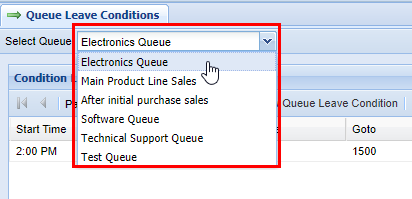
Ensure that you selected the correct Queue before making any changes. You can select a Queue via the drop-down menu in the top left-hand portion of the **Queue Leave Conditions** screen (see image below).

[![image.png](https://public.intellasoft.net/uploads/images/gallery/2024-07/scaled-1680-/ZSuimage.png)](https://public.intellasoft.net/uploads/images/gallery/2024-07/ZSuimage.png)
## Adding a New Queue Leave Condition

<div class="wiki-content" id="bkmrk-required-start-time-"><div class="contentLayout2"><div class="columnLayout single" data-layout="single"><div class="cell normal" data-type="normal"><div class="innerCell"><div class="panel conf-macro output-block" data-hasbody="true" data-macro-name="panel" style="border-width: 1px;"><div class="panelContent"><div class="sectionColumnWrapper conf-macro output-block" data-hasbody="true" data-macro-name="section"><div class="sectionMacro"><div class="sectionMacroRow"><div class="columnMacro conf-macro output-block" data-hasbody="true" data-macro-name="column" style="width: 50%; min-width: 50%; max-width: 50%;"><div class="table-wrap"></div></div></div></div></div></div></div></div></div></div></div></div>1\) Navigate to the **Queue Leave Conditions** screen from the **Navigation Panel.**

2\) Select the correct **Queue** via the drop **Select Queue** function at the top left-hand part of the screen.

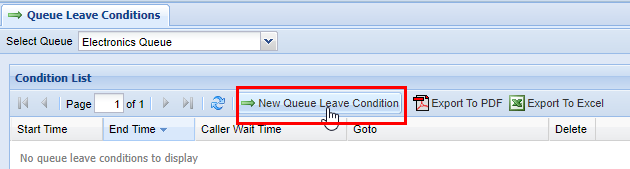
3\) Click the button labeled **New Queue Leave Condition**.

[![image.png](https://public.intellasoft.net/uploads/images/gallery/2024-07/scaled-1680-/Tacimage.png)](https://public.intellasoft.net/uploads/images/gallery/2024-07/Tacimage.png)
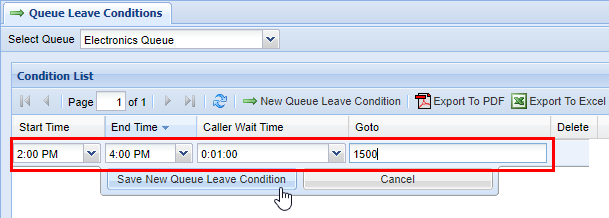
4\) Next choose a **Start Time, End Time, Caller Wait Time,** and **Goto** destination.

<table border="1" id="bkmrk-name-type-descriptio" style="border-collapse: collapse; width: 100%;"><colgroup><col style="width: 11.0012%;"></col><col style="width: 18.047%;"></col><col style="width: 9.93316%;"></col><col style="width: 60.895%;"></col></colgroup><thead><tr><td>  
</td><td>Name  
</td><td>Type  
</td><td>Description  
</td></tr></thead><tbody><tr><td class="confluenceTd">**Required**</td><td class="confluenceTd">Start Time</td><td class="confluenceTd">List</td><td class="confluenceTd">Start Time (24 hour clock)</td></tr><tr><td class="confluenceTd">  
</td><td class="confluenceTd">End Time</td><td class="confluenceTd">List</td><td class="confluenceTd">End Time (24 hour clock)</td></tr><tr><td class="confluenceTd">  
</td><td class="confluenceTd">Caller Wait Time</td><td class="confluenceTd">List</td><td class="confluenceTd">Caller Queue Queue Wait Time (15 second increments)</td></tr><tr><td class="confluenceTd">  
</td><td class="confluenceTd">Goto</td><td class="confluenceTd">Field</td><td class="confluenceTd">Usually numeric, goes to unavailable destination</td></tr></tbody></table>

5\) Click the **Save Queue Leave Condition** button. After you click save you will see a message stating **Changes Saved**.

[![image.png](https://public.intellasoft.net/uploads/images/gallery/2024-07/scaled-1680-/E44image.png)](https://public.intellasoft.net/uploads/images/gallery/2024-07/E44image.png)<span class="confluence-embedded-file-wrapper confluence-embedded-manual-size">![](https://public.intellasoft.net/download/attachments/8029974/image2017-8-4_13-50-1.png?version=1&modificationDate=1501869001839&api=v2)</span>
## Removing a Queue Leave Condition

1\) Navigate to the **Queue Leave Condition** <span style="font-size: 14.0px;">screen from the </span>**Navigation Panel.**

<span style="font-size: 14.0px;">2) Find the </span>**Queue Leave Condition** <span style="font-size: 14.0px;">you wish to delete, highlight it by clicking on it, and then click the red </span>**X** <span style="font-size: 14.0px;">under the </span>**Delete** <span style="font-size: 14.0px;">column.</span>

<span style="font-size: 14.0px;">3) A confirmation pop-up will appear confirming your selection. Click </span>**OK.**<span style="font-size: 14.0px;"> You will see a message stating </span>**Changes Saved.**<span style="font-size: 14.0px;">  
</span>

[![image.png](https://public.intellasoft.net/uploads/images/gallery/2024-07/scaled-1680-/MgNimage.png)](https://public.intellasoft.net/uploads/images/gallery/2024-07/MgNimage.png)

# Queue Settings

## Overview

This screen is for creating and configuring basic settings for new Queues**.** There are a handful of required settings and a larger group of **Additional Settings** that may be required depending on what your organization is trying to achieve on a per-queue basis.

- [Adding a Queue](#bkmrk-adding-a-queue)
    - [Additional CallQueue Settings](#bkmrk-additional-callqueue)
- [Removing a Queue](#bkmrk-deleting-a-queue%C2%A0)

## Adding a Queue

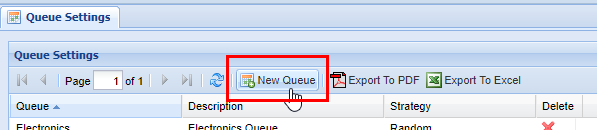
1\) Navigate to the **Queue Settings screen from the **Navigation Panel.** Click the **New Queue** button.

[![image.png](https://public.intellasoft.net/uploads/images/gallery/2024-07/scaled-1680-/N0Eimage.png)](https://public.intellasoft.net/uploads/images/gallery/2024-07/N0Eimage.png)

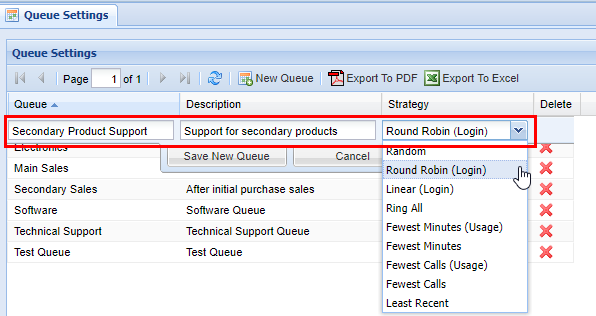
2\) Next choose a **Queue** name, **Description,** and **Strategy.**

<table border="1" id="bkmrk-field-type-descripti" style="border-collapse: collapse; width: 100%;"><colgroup><col style="width: 10.5068%;"></col><col style="width: 13.3498%;"></col><col style="width: 10.1865%;"></col><col style="width: 65.8333%;"></col></colgroup><tbody><tr><td>  
</td><td>**Field**  
</td><td>**Type**  
</td><td>**Description**  
</td></tr><tr><td class="confluenceTd">**Required**</td><td class="confluenceTd">Queue</td><td class="confluenceTd">Field</td><td class="confluenceTd">Name of Queue</td></tr><tr><td class="confluenceTd">  
</td><td class="confluenceTd">Description</td><td class="confluenceTd">Field</td><td class="confluenceTd">Description of Queue</td></tr><tr><td class="confluenceTd">  
</td><td class="confluenceTd">Strategy</td><td class="confluenceTd">List</td><td class="confluenceTd">How Queue behaves when it calls available Agents (see below)</td></tr></tbody></table>

<table border="1" id="bkmrk-strategy-description" style="border-collapse: collapse; width: 100%;"><colgroup><col style="width: 23.889%;"></col><col style="width: 76.2346%;"></col></colgroup><thead><tr><td>**Strategy**</td><td>**Description**  
</td></tr></thead><tbody><tr><td class="confluenceTd">**Random**</td><td class="confluenceTd">Calls agent in a true random fashion.</td></tr><tr><td class="confluenceTd">**Round Robin (Login)**</td><td class="confluenceTd">Calls Agent in a circular order based on login time.</td></tr><tr><td class="confluenceTd">**Linear (Login)**</td><td class="confluenceTd">Calls are based on who has logged in first.</td></tr><tr><td class="confluenceTd">**Ring All**</td><td class="confluenceTd">Calls all available agents (not currently on a call).</td></tr><tr><td class="confluenceTd">**Fewest Minutes (Usage)**</td><td class="confluenceTd">Calls agent with the fewest minutes of talk time for queue calls with respect to the rest of the agent team’s login time.</td></tr><tr><td class="confluenceTd">**Fewest Minutes**</td><td class="confluenceTd">Calls the first available agent with the fewest minutes of talk time for queue calls (and only queue calls).</td></tr><tr><td class="confluenceTd">**Fewest Calls (Usage)**</td><td class="confluenceTd">Uses the same logic as **Fewest Minutes Usage** except uses total queue calls as the basis.</td></tr><tr><td class="confluenceTd">**Fewest Calls**</td><td class="confluenceTd">Will call the first available agent with the fewest number of calls (only queue calls are counted).</td></tr><tr><td class="confluenceTd">**Last Recent**</td><td class="confluenceTd">Will call the agent who has not gotten a queue call for the longest (does not factor in other activity).</td></tr></tbody></table>

<div class="sectionColumnWrapper conf-macro output-block" data-hasbody="true" data-macro-name="section" id="bkmrk--3"><div class="sectionMacro"><div class="sectionMacroRow"><div class="columnMacro conf-macro output-block" data-hasbody="true" data-macro-name="column" style="width: 50%; min-width: 50%; max-width: 50%;"><div class="table-wrap">  
</div></div></div></div></div><div class="sectionColumnWrapper conf-macro output-block" data-hasbody="true" data-macro-name="section" id="bkmrk-randon-calls-agent-i"><div class="sectionMacro"><div class="sectionMacroRow"><div class="columnMacro conf-macro output-block" data-hasbody="true" data-macro-name="column" style="width: 50%; min-width: 50%; max-width: 50%;"><div class="table-wrap">  
</div></div></div></div></div>[![image.png](https://public.intellasoft.net/uploads/images/gallery/2024-07/scaled-1680-/sRRimage.png)](https://public.intellasoft.net/uploads/images/gallery/2024-07/sRRimage.png)

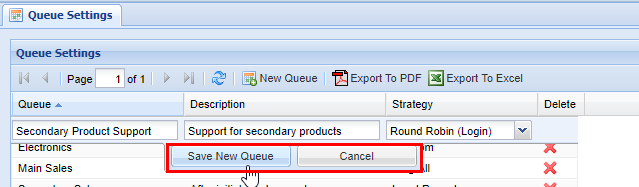
3\) Lastly, click the **Save New Queue** button to save**.**  After you click save you will see a message stating **Changes Saved**.

[![image.png](https://public.intellasoft.net/uploads/images/gallery/2024-07/scaled-1680-/sqRimage.png)](https://public.intellasoft.net/uploads/images/gallery/2024-07/sqRimage.png)**<span class="confluence-embedded-file-wrapper confluence-embedded-manual-size">![](https://public.intellasoft.net/download/attachments/8029977/image2017-8-4_16-0-21.png?version=1&modificationDate=1501876822029&api=v2)</span>**

### Additional CallQueue Settings

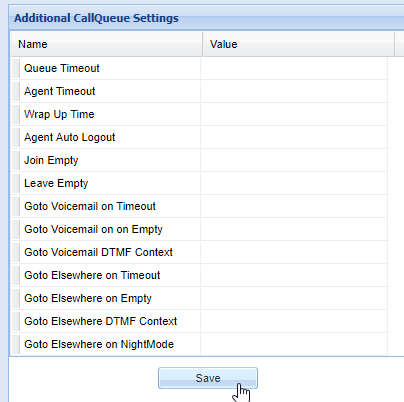
There are additional settings to consider when configuring a new Queue. These settings are located on the right side of the Queue Settings screen and are as follows.

<table border="1" id="bkmrk-name-value-queue-tim" style="border-collapse: collapse; width: 100%;"><colgroup><col style="width: 26.1112%;"></col><col style="width: 74.0124%;"></col></colgroup><thead><tr><td>**Name**  
</td><td>**Value**

</td></tr></thead><tbody><tr><td class="confluenceTd">Queue Timeout</td><td class="confluenceTd">Maximum time a caller can wait in this queue.

</td></tr><tr><td class="confluenceTd">Agent Timeout</td><td class="confluenceTd">How long to ring an agent before trying the next.

</td></tr><tr><td class="confluenceTd">Wrap Up Time</td><td class="confluenceTd">How long to pause calls to an agent after a call.

</td></tr><tr><td class="confluenceTd">Agent Auto Logout</td><td class="confluenceTd">Yes/No: Defines whether or not an agent is automatically logged out if they do not pickup</td></tr><tr><td class="confluenceTd">Join Empty</td><td class="confluenceTd">Yes/No: Defines whether or not a caller can enter an empty queue (no agents)</td></tr><tr><td class="confluenceTd">Leave Empty</td><td class="confluenceTd">Yes/No: Defines if a caller shall leave a queue if it becomes empty.</td></tr><tr><td class="confluenceTd">Goto Voicemail on Timeout</td><td class="confluenceTd">Defines where caller is sent if the queue times out (if this is set above)</td></tr><tr><td class="confluenceTd">Goto Voicemail on Empty</td><td class="confluenceTd">Defines where caller is sent if the queue has not available agents</td></tr><tr><td class="confluenceTd">Goto Voicemail DTMF Context</td><td class="confluenceTd">Allows a caller to exit a queue and be sent to voicemail by digit entry on phone</td></tr><tr><td class="confluenceTd">Goto Elsewhere on Timeout</td><td class="confluenceTd">Defines where the caller goes if they timeout, if not a voicemail.</td></tr><tr><td class="confluenceTd">Goto Elsewhere on Empty</td><td class="confluenceTd">Defines where the caller goes if their are no agents available in the queue , if not a voicemail.</td></tr><tr><td class="confluenceTd">Goto Elsewhere on DTMF Context</td><td class="confluenceTd">Defines a different destination that caller will be sent to if they digit press on their phone.</td></tr><tr><td class="confluenceTd">Goto Elsewhere on NightMode</td><td class="confluenceTd">Sends the caller elsewhere if the queue in question is in night mode. See **[DayNight Schedule](https://public.intellasoft.net/books/web-portal-dL9/page/daynight-schedule)** and **[Agent Assignments](https://public.intellasoft.net/books/intellaqueue-nQF/page/agent-assignments)** for additional information.</td></tr></tbody></table>

<div class="wiki-content" id="bkmrk-queue-timeout-maximu"><div class="contentLayout2"><div class="columnLayout single" data-layout="single"><div class="cell normal" data-type="normal"><div class="innerCell"><div class="panel conf-macro output-block" data-hasbody="true" data-macro-name="panel" style="border-width: 1px;"><div class="panelContent"><div class="sectionColumnWrapper conf-macro output-block" data-hasbody="true" data-macro-name="section"><div class="sectionMacro"><div class="sectionMacroRow"><div class="columnMacro conf-macro output-block" data-hasbody="true" data-macro-name="column" style="width: 50%; min-width: 50%; max-width: 50%;"><div class="table-wrap">  
</div></div></div></div></div></div></div></div></div></div></div></div>After you make changes in the **Additional CallQueue Settings** click the **Save** button at the bottom. You will see a message stating **Changes Saved.**

[![image.png](https://public.intellasoft.net/uploads/images/gallery/2024-07/scaled-1680-/yGmimage.png)](https://public.intellasoft.net/uploads/images/gallery/2024-07/yGmimage.png)

## Removing a Queue 

1\) Navigate to the **Queue Settings screen from the **Navigation Panel.**

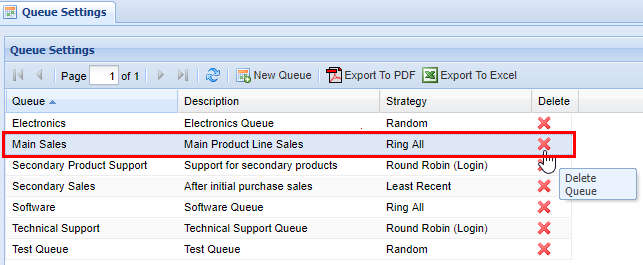
2\) Find the **Queue** you wish to delete, highlight it by clicking on it, then click on the red **X** in the **Delete** column.

3\) A confirmation pop-up will appear confirming your selection. Click **OK.** You will see a message stating **Changes Saved**.

[![image.png](https://public.intellasoft.net/uploads/images/gallery/2024-07/scaled-1680-/YSMimage.png)](https://public.intellasoft.net/uploads/images/gallery/2024-07/YSMimage.png)
# Generate Reports (IntellaQueue)

# Generate Reports (IntellaQueue)

Please navigate to the appropriate category on the left-sidebar.

# Agent Calls

<div class="page-metadata" id="bkmrk-"></div><div class="wiki-content" id="bkmrk--1"><div class="contentLayout2"><div class="columnLayout single" data-layout="single"><div class="cell normal" data-type="normal"><div class="innerCell">  
</div></div></div><div class="columnLayout two-equal" data-layout="two-equal"><div class="cell normal" data-type="normal"><div class="innerCell"><div class="table-wrap"><table class="confluenceTable tablesorter tablesorter-default" role="grid"><colgroup><col></col><col></col></colgroup><thead aria-label="Use column header buttons to sort"><tr class="tablesorter-headerRow" role="row"></tr></thead></table>

</div></div></div></div></div></div><div class="cell normal" data-type="normal" id="bkmrk-field-description-ag"><div class="innerCell"><div class="table-wrap"><table class="confluenceTable tablesorter tablesorter-default" role="grid"><tbody><tr><td>**Field**  
</td><td>**Description**

</td></tr><tr role="row"><td class="confluenceTd">Agent Name</td><td class="confluenceTd">Name of the agent

</td></tr><tr role="row"><td class="confluenceTd">Date</td><td class="confluenceTd">The date within the date range selected

</td></tr><tr role="row"><td class="confluenceTd">Tot Login</td><td class="confluenceTd">Total amount of time the agent has been logged in

</td></tr><tr role="row"><td class="confluenceTd">Calls In</td><td class="confluenceTd">\# of inbound calls to the agent while the agent is logged in

</td></tr><tr role="row"><td class="confluenceTd">Queue In</td><td class="confluenceTd">\# of inbound queue calls only

</td></tr><tr role="row"><td class="confluenceTd">Agent In</td><td class="confluenceTd">\# of non-queue inbound calls

</td></tr><tr role="row"><td class="confluenceTd">Avg Talk In</td><td class="confluenceTd">Average time agent is talking for inbound calls

</td></tr><tr role="row"><td class="confluenceTd">Tot Talk In</td><td class="confluenceTd">Total time the agent is talking for inbound calls

</td></tr><tr role="row"><td class="confluenceTd">Calls Out</td><td class="confluenceTd">\# of outbound calls from agent while the agent is logged in

</td></tr><tr role="row"><td class="confluenceTd">Dialer Out</td><td class="confluenceTd">\# of dialer calls only

</td></tr><tr role="row"><td class="confluenceTd">Agent Out</td><td class="confluenceTd">\# of outbound calls only

</td></tr></tbody></table>

</div></div></div><div class="cell normal" data-type="normal" id="bkmrk--2"><div class="innerCell"><div class="table-wrap"><table class="confluenceTable tablesorter tablesorter-default" role="grid"><colgroup><col></col><col></col></colgroup><thead aria-label="Use column header buttons to sort"><tr class="tablesorter-headerRow" role="row"></tr></thead></table>

</div></div></div><div class="wiki-content" id="bkmrk-field-description-av"><div class="contentLayout2"><div class="columnLayout two-equal" data-layout="two-equal"><div class="cell normal" data-type="normal"><div class="innerCell"><div class="table-wrap"><table class="confluenceTable tablesorter tablesorter-default" role="grid"><tbody><tr><td>**Field**  
</td><td>**Description**

</td></tr><tr role="row"><td class="confluenceTd">Avg Talk Out</td><td class="confluenceTd">Average time agent is talking for outbound calls

</td></tr><tr role="row"><td class="confluenceTd">Tot Talk Out</td><td class="confluenceTd">Total time agent is talking on the phone for outbound calls

</td></tr><tr role="row"><td class="confluenceTd">Tot Calls</td><td class="confluenceTd">\# of total calls

</td></tr><tr role="row"><td class="confluenceTd">Tot Talk</td><td class="confluenceTd">Total time the agent is talking on all calls

</td></tr><tr role="row"><td class="confluenceTd">Avg Answer</td><td class="confluenceTd">Avg amount of time it takes an agent to pick up a ringing call

</td></tr><tr role="row"><td class="confluenceTd">Longest Wait</td><td class="confluenceTd">Max time a caller waited before getting picked up

Wait times for both inbound and outbound queue calls

</td></tr><tr role="row"><td class="confluenceTd">Tot Hold In</td><td class="confluenceTd">Total time agents put callers on hold for all queue calls

</td></tr><tr role="row"><td class="confluenceTd">Tot Pause</td><td class="confluenceTd">Total time agents put callers on hold for all queue calls

</td></tr><tr role="row"><td class="confluenceTd">Avg Pause</td><td class="confluenceTd">Avg time agents put callers on hold for all queue calls

</td></tr><tr role="row"><td class="confluenceTd">Pauses</td><td class="confluenceTd">\# of pauses

</td></tr><tr role="row"><td class="confluenceTd">Missed Rings</td><td class="confluenceTd">\# of calls that rang the agent who didn't pick up

Ex: call rings agent's phone, gives up, next agent answers

The first agent has a missed ring.

</td></tr><tr role="row"><td class="confluenceTd">Xfer Calls

</td><td class="confluenceTd">\# of calls the agent received that were transferred

</td></tr></tbody></table>

</div></div></div></div></div></div><div id="bkmrk--3"><div class="no-print" id="bkmrk--4"></div></div>

# Agent Calls Full

<div class="wiki-content" id="bkmrk-"><div class="contentLayout2"><div class="columnLayout two-equal" data-layout="two-equal"><div class="cell normal" data-type="normal"><div class="innerCell"><div class="table-wrap"><table class="confluenceTable tablesorter tablesorter-default" role="grid"><colgroup><col></col><col></col></colgroup><thead aria-label="Use column header buttons to sort"><tr class="tablesorter-headerRow" role="row"></tr></thead></table>

</div></div></div></div></div></div><div class="cell normal" data-type="normal" id="bkmrk-field-description-in"><div class="innerCell"><div class="table-wrap"><table class="confluenceTable tablesorter tablesorter-default" role="grid"><tbody><tr><td>**Field**  
</td><td>**Description**

</td></tr><tr role="row"><td class="confluenceTd">In - Total Calls</td><td class="confluenceTd">\# of all inbound calls to agent (queue and direct)

</td></tr><tr role="row"><td class="confluenceTd">In - Agent Total</td><td class="confluenceTd">\# of direct only calls (non queue calls) to agent

</td></tr><tr role="row"><td class="confluenceTd">In - Queue Total</td><td class="confluenceTd">\# of inbound queue only calls

</td></tr><tr role="row"><td class="confluenceTd">In - Queue External</td><td class="confluenceTd">\# of queue only calls from external callers

</td></tr><tr role="row"><td class="confluenceTd">In - Queue Internal</td><td class="confluenceTd">\# of queue only calls from internal extensions

</td></tr><tr role="row"><td class="confluenceTd">Total Calls</td><td class="confluenceTd">\# of total calls answered or made by the agent

</td></tr><tr role="row"><td class="confluenceTd">In - Queue Hold Avg</td><td class="confluenceTd">Average hold time per queue only call

</td></tr><tr role="row"><td class="confluenceTd">In - Queue Answer Avg</td><td class="confluenceTd">Average ring time per queue only call (answer speed)

</td></tr><tr role="row"><td class="confluenceTd">Total Avg Talk</td><td class="confluenceTd">Average talk time across all calls for agent

</td></tr><tr role="row"><td class="confluenceTd">In - Total Talk Avg</td><td class="confluenceTd">Average talk time per call for all inbound calls

</td></tr><tr role="row"><td class="confluenceTd">In - Queue Talk Avg</td><td class="confluenceTd">Average talk time per call of queue only calls

</td></tr><tr role="row"><td class="confluenceTd">In - Queue Wait Max</td><td class="confluenceTd">Longest time waiting until picked up queue only calls

</td></tr><tr role="row"><td class="confluenceTd">Agent Name</td><td class="confluenceTd">Name of the agent

</td></tr><tr role="row"><td class="confluenceTd">Date</td><td class="confluenceTd">The date within the date range selected

</td></tr><tr role="row"><td class="confluenceTd">In - Queue Hold Total</td><td class="confluenceTd">Total hold time callers are on hold for queue only calls

</td></tr><tr role="row"><td class="confluenceTd">Total Login</td><td class="confluenceTd">Total logged in time for the agent

</td></tr><tr role="row"><td class="confluenceTd">Total Talk</td><td class="confluenceTd">Total talk time across all calls for agent

</td></tr><tr role="row"><td class="confluenceTd">In - Total Talk</td><td class="confluenceTd">Total talk time across all calls for agent

</td></tr><tr role="row"><td class="confluenceTd">In - Queue Talk Total</td><td class="confluenceTd">Total talk time of queue only calls

</td></tr></tbody></table>

</div></div></div><div class="cell normal" data-type="normal" id="bkmrk--1"><div class="innerCell"><div class="table-wrap"><table class="confluenceTable tablesorter tablesorter-default" role="grid"><colgroup><col></col><col></col></colgroup><thead aria-label="Use column header buttons to sort"><tr class="tablesorter-headerRow" role="row"></tr></thead></table>

</div></div></div><table class="confluenceTable tablesorter tablesorter-default" id="bkmrk-field-description-in-1" role="grid"><tbody><tr><td>**Field**</td><td>**Description**

</td></tr><tr role="row"><td class="confluenceTd">In - Agent Talk Avg</td><td class="confluenceTd">Average talk time per direct only calls to agent

</td></tr><tr role="row"><td class="confluenceTd">In - Agent Talk Total</td><td class="confluenceTd">Total talk time of direct only calls to agent

</td></tr><tr role="row"><td class="confluenceTd">In - Agent Ext</td><td class="confluenceTd">\# of direct only calls to agent from external callers

</td></tr><tr role="row"><td class="confluenceTd">In - Agent Int</td><td class="confluenceTd">\# of direct only calls to agent from internal extensions

</td></tr><tr role="row"><td class="confluenceTd">Out - Total Calls</td><td class="confluenceTd">\# of outbound calls from agent (dialer and direct)

</td></tr><tr role="row"><td class="confluenceTd">Out - Total Talk</td><td class="confluenceTd">Total talk time for outbound only calls

</td></tr><tr role="row"><td class="confluenceTd">Out - Total Talk Avg</td><td class="confluenceTd">Average talk time per outbound only call

</td></tr><tr role="row"><td class="confluenceTd">Out - Dialer Total</td><td class="confluenceTd">\# of dialer only calls

</td></tr><tr role="row"><td class="confluenceTd">Out - Dialer Talk Avg</td><td class="confluenceTd">Average talk time per dialer only calls

</td></tr><tr role="row"><td class="confluenceTd">Out - Dialer Talk Tot</td><td class="confluenceTd">Total talk time of dialer only calls

</td></tr><tr role="row"><td class="confluenceTd">Out - Agent Total</td><td class="confluenceTd">\# of direct agent outbound only calls

</td></tr><tr role="row"><td class="confluenceTd">Out - Agent Ext</td><td class="confluenceTd">\# of direct agent outbound only calls to external numbers

</td></tr><tr role="row"><td class="confluenceTd">Out - Agent Int</td><td class="confluenceTd">\# of direct agent outbound only calls to extensions

</td></tr><tr role="row"><td class="confluenceTd">Out - Agent Talk Avg</td><td class="confluenceTd">Average talk time per direct agent outbound only calls

</td></tr><tr role="row"><td class="confluenceTd">Out - Agent Talk Total</td><td class="confluenceTd">Total talk time of direct agent outbound only calls

</td></tr><tr role="row"><td class="confluenceTd">Pause Total</td><td class="confluenceTd">Total pause time for the agent across all queues (in and out)

</td></tr><tr role="row"><td class="confluenceTd">Pause Avg</td><td class="confluenceTd">Average pause time per pause across all queues

</td></tr><tr role="row"><td class="confluenceTd">Pause Count</td><td class="confluenceTd">\# of pauses across all queues

</td></tr><tr role="row"><td class="confluenceTd">Missed Rings</td><td class="confluenceTd">\# of calls that rang the agent who didn't pick up

</td></tr><tr role="row"><td class="confluenceTd">Xfer Calls</td><td class="confluenceTd">\# of calls the agent received that were transferred

</td></tr></tbody></table>

# Per-Agent Per-Queue

<div class="page-metadata" id="bkmrk-"></div><div class="wiki-content" id="bkmrk--1"><div class="contentLayout2"><div class="columnLayout single" data-layout="single"><div class="cell normal" data-type="normal"><div class="innerCell">  
</div></div></div><div class="columnLayout two-equal" data-layout="two-equal"><div class="cell normal" data-type="normal"><div class="innerCell"><div class="table-wrap"><table class="confluenceTable tablesorter tablesorter-default" role="grid"><colgroup><col></col><col></col></colgroup><thead aria-label="Use column header buttons to sort"><tr class="tablesorter-headerRow" role="row"></tr></thead></table>

</div></div></div></div></div></div><div class="cell normal" data-type="normal" id="bkmrk-field-description-ag"><div class="innerCell"><div class="table-wrap"><table class="confluenceTable tablesorter tablesorter-default" role="grid"><tbody><tr><td>**Field**  
</td><td>**Description**

</td></tr><tr role="row"><td class="confluenceTd">Agent Name</td><td class="confluenceTd">Name of the agent

</td></tr><tr role="row"><td class="confluenceTd">Date</td><td class="confluenceTd">The date within the date range selected

</td></tr><tr role="row"><td class="confluenceTd">Logged In</td><td class="confluenceTd">Total time agent has been logged in for the particular queue

</td></tr><tr role="row"><td class="confluenceTd">Queue</td><td class="confluenceTd">Queue name the agent is logged into

</td></tr><tr role="row"><td class="confluenceTd">Tot Calls</td><td class="confluenceTd">\# of calls the agent answered for the particular queue

</td></tr><tr role="row"><td class="confluenceTd">Avg Talk</td><td class="confluenceTd">Average talk time per call for the particular queue calls

</td></tr><tr role="row"><td class="confluenceTd">Tot Talk</td><td class="confluenceTd">Total talk time across all calls for the particular queue calls

</td></tr><tr role="row"><td class="confluenceTd">Answer Speed</td><td class="confluenceTd">Average ring time per particular queue call

</td></tr></tbody></table>

</div></div></div><div class="cell normal" data-type="normal" id="bkmrk--2"><div class="innerCell"><div class="table-wrap"><table class="confluenceTable tablesorter tablesorter-default" role="grid"><colgroup><col></col><col></col></colgroup><thead aria-label="Use column header buttons to sort"><tr class="tablesorter-headerRow" role="row"></tr></thead></table>

</div></div></div><div class="wiki-content" id="bkmrk-field-description-lo"><div class="contentLayout2"><div class="columnLayout two-equal" data-layout="two-equal"><div class="cell normal" data-type="normal"><div class="innerCell"><div class="table-wrap"><table class="confluenceTable tablesorter tablesorter-default" role="grid" style="width: 62.3457%; height: 378px;"><tbody><tr><td style="width: 20.3465%;">**Field**  
</td><td style="width: 79.5281%;">**Description**

</td></tr><tr role="row" style="height: 51.8px;"><td class="confluenceTd" style="width: 20.3465%; height: 51.8px;">Longest Wait</td><td class="confluenceTd" style="width: 79.5281%; height: 51.8px;">Max time a caller waited before getting picked up for queue

</td></tr><tr role="row" style="height: 35.4px;"><td class="confluenceTd" style="width: 20.3465%; height: 35.4px;">Tot Hold</td><td class="confluenceTd" style="width: 79.5281%; height: 35.4px;">Total hold time callers are on hold for the particular queue

</td></tr><tr role="row" style="height: 35.4px;"><td class="confluenceTd" style="width: 20.3465%; height: 35.4px;">Avg Hold</td><td class="confluenceTd" style="width: 79.5281%; height: 35.4px;">Average hold time per call for the particular queue

</td></tr><tr role="row" style="height: 57.8px;"><td class="confluenceTd" style="width: 20.3465%; height: 57.8px;">Tot Pause</td><td class="confluenceTd" style="width: 79.5281%; height: 57.8px;">Total pause time for the agent for the particular queue

Note that the grand total for the agent is multi-counted

</td></tr><tr role="row" style="height: 35.4px;"><td class="confluenceTd" style="width: 20.3465%; height: 35.4px;">Avg Pause</td><td class="confluenceTd" style="width: 79.5281%; height: 35.4px;">Average pause time for the agent for the particular queue

</td></tr><tr role="row" style="height: 57.8px;"><td class="confluenceTd" style="width: 20.3465%; height: 57.8px;">Pauses</td><td class="confluenceTd" style="width: 79.5281%; height: 57.8px;">\# of pauses for the agent for the particular queue

Note that the grand total for the agent is multi-counted

</td></tr><tr role="row" style="height: 46.6px;"><td class="confluenceTd" style="width: 20.3465%; height: 46.6px;">Missed Rings</td><td class="confluenceTd" style="width: 79.5281%; height: 46.6px;">\# of calls that rang the agent who didn't pick up

</td></tr><tr role="row" style="height: 57.8px;"><td class="confluenceTd" style="width: 20.3465%; height: 57.8px;">Xfer Calls</td><td class="confluenceTd" style="width: 79.5281%; height: 57.8px;">\# of calls agent received that were transferred to the queue

</td></tr></tbody></table>

</div></div></div></div></div></div><div id="bkmrk--3"><div class="no-print" id="bkmrk--4"></div><div class="pageSection group" id="bkmrk--5"><div class="labels-section-content content-column" entityid="8029985" entitytype="page"><div class="labels-content">  
</div></div></div></div>

# Per-Queue Per-Agent

<div class="page-metadata" id="bkmrk-"></div><div class="wiki-content" id="bkmrk--1"><div class="contentLayout2"><div class="columnLayout single" data-layout="single"><div class="cell normal" data-type="normal"><div class="innerCell">  
</div></div></div><div class="columnLayout two-equal" data-layout="two-equal"><div class="cell normal" data-type="normal"><div class="innerCell"><div class="table-wrap"><table class="confluenceTable tablesorter tablesorter-default" role="grid"><colgroup><col></col><col></col></colgroup><thead aria-label="Use column header buttons to sort"><tr class="tablesorter-headerRow" role="row"></tr></thead></table>

</div></div></div></div></div></div><div class="cell normal" data-type="normal" id="bkmrk-field-description-qu"><div class="innerCell"><div class="table-wrap"><table class="confluenceTable tablesorter tablesorter-default" role="grid"><tbody><tr><td>**Field**  
</td><td>**Description**

</td></tr><tr role="row"><td class="confluenceTd">Queue</td><td class="confluenceTd">Queue name all the agents are logged into

</td></tr><tr role="row"><td class="confluenceTd">Agent Name</td><td class="confluenceTd">Name of the agent logged into the particular queue

</td></tr><tr role="row"><td class="confluenceTd">Date</td><td class="confluenceTd">The date within the date range selected

</td></tr><tr role="row"><td class="confluenceTd">Tot Login</td><td class="confluenceTd">Total time agent has been logged in for the particular queue

</td></tr><tr role="row"><td class="confluenceTd">Tot Calls</td><td class="confluenceTd">\# of calls the agent answered for the particular queue

</td></tr><tr role="row"><td class="confluenceTd">Avg Talk</td><td class="confluenceTd">Average talk time per call for the particular queue calls

</td></tr><tr role="row"><td class="confluenceTd">Tot Talk</td><td class="confluenceTd">Total talk time across all calls for the particular queue calls

</td></tr><tr role="row"><td class="confluenceTd">Answer Speed</td><td class="confluenceTd">Average ring time per particular queue call

</td></tr></tbody></table>

</div></div></div><div class="cell normal" data-type="normal" id="bkmrk--2"><div class="innerCell"><div class="table-wrap"><table class="confluenceTable tablesorter tablesorter-default" role="grid"><colgroup><col></col><col></col></colgroup><thead aria-label="Use column header buttons to sort"><tr class="tablesorter-headerRow" role="row"></tr></thead></table>

</div></div></div><div class="wiki-content" id="bkmrk-field-description-lo"><div class="contentLayout2"><div class="columnLayout two-equal" data-layout="two-equal"><div class="cell normal" data-type="normal"><div class="innerCell"><div class="table-wrap"><table class="confluenceTable tablesorter tablesorter-default" role="grid"><tbody><tr><td>**Field**  
</td><td>**Description**

</td></tr><tr role="row"><td class="confluenceTd">Longest Wait</td><td class="confluenceTd">Max time a caller waited before getting picked up for queue

</td></tr><tr role="row"><td class="confluenceTd">Tot Hold</td><td class="confluenceTd">Total hold time callers are on hold for the particular queue

</td></tr><tr role="row"><td class="confluenceTd">Avg Hold</td><td class="confluenceTd">Average hold time per call for the particular queue

</td></tr><tr role="row"><td class="confluenceTd">Tot Pause</td><td class="confluenceTd">Total pause time for the agent for the particular queue

</td></tr><tr role="row"><td class="confluenceTd">Avg Pause</td><td class="confluenceTd">Average pause time for the agent for the particular queue

</td></tr><tr role="row"><td class="confluenceTd">Pauses</td><td class="confluenceTd">\# of pauses for the agent for the particular queue

</td></tr><tr role="row"><td class="confluenceTd">Missed Rings</td><td class="confluenceTd">\# of calls that rang the agent who didn't pick up

</td></tr><tr role="row"><td class="confluenceTd">Xfer Calls</td><td class="confluenceTd">\# of calls agent received that were transferred to the queue

</td></tr></tbody></table>

</div></div></div></div></div></div><div id="bkmrk--3"><div class="no-print" id="bkmrk--4"></div></div>

# Per-Queue Wait Cutoffs

<div class="page-metadata" id="bkmrk-"></div><div class="wiki-content" id="bkmrk--1"><div class="contentLayout2"><div class="columnLayout single" data-layout="single"><div class="cell normal" data-type="normal"><div class="innerCell"><div class="table-wrap"><table class="confluenceTable tablesorter tablesorter-default" role="grid"><colgroup><col></col><col></col></colgroup><thead aria-label="Use column header buttons to sort"><tr class="tablesorter-headerRow" role="row"></tr></thead></table>

</div></div></div></div></div></div><table class="confluenceTable tablesorter tablesorter-default" id="bkmrk-field-description-qu" role="grid"><tbody><tr><td>**Field**  
</td><td>**Description**

</td></tr><tr role="row"><td class="confluenceTd">Queue</td><td class="confluenceTd">Name of the queue

</td></tr><tr role="row"><td class="confluenceTd">Date</td><td class="confluenceTd">The date within the date range selected

</td></tr><tr role="row"><td class="confluenceTd">\# 0-30 sec</td><td class="confluenceTd">\# of calls for queue for duration within 0 to 30 seconds

</td></tr><tr role="row"><td class="confluenceTd">% 0-30 sec</td><td class="confluenceTd">% of calls for queue for duration within 0 to 30 seconds

</td></tr><tr role="row"><td class="confluenceTd">\# 31-60 sec</td><td class="confluenceTd">\# of calls for queue for duration within 31 to 60 seconds

</td></tr><tr role="row"><td class="confluenceTd">% 31-60 sec</td><td class="confluenceTd">% of calls for queue for duration within 31 to 60 seconds

</td></tr><tr role="row"><td class="confluenceTd">\# 61-120 sec</td><td class="confluenceTd">\# of calls for queue for duration within 61 to 120 seconds

</td></tr><tr role="row"><td class="confluenceTd">% 61-120 sec</td><td class="confluenceTd">% of calls for queue for duration within 61 to 120 seconds

</td></tr><tr role="row"><td class="confluenceTd">\# 121+ sec</td><td class="confluenceTd">\# of calls for queue for duration of more than 121 seconds

</td></tr><tr role="row"><td class="confluenceTd">% 121+ sec</td><td class="confluenceTd">% of calls for queue for duration of more than 121 seconds

</td></tr></tbody></table>

# Avg Calls Per Hour Per Day

<div class="page-metadata" id="bkmrk-"></div><div class="wiki-content" id="bkmrk--1"><div class="contentLayout2"><div class="columnLayout single" data-layout="single"><div class="cell normal" data-type="normal"><div class="innerCell"><div class="table-wrap"><table class="confluenceTable tablesorter tablesorter-default" role="grid"><colgroup><col></col><col></col></colgroup><thead aria-label="Use column header buttons to sort"><tr class="tablesorter-headerRow" role="row"></tr></thead></table>

</div></div></div></div></div></div><table class="confluenceTable tablesorter tablesorter-default" id="bkmrk-field-description-da" role="grid"><tbody><tr><td>**Field**  
</td><td>**Description**

</td></tr><tr role="row"><td class="confluenceTd">Date</td><td class="confluenceTd">The date within the date range selected

</td></tr><tr role="row"><td class="confluenceTd">Queue Name</td><td class="confluenceTd">Name of the queue

</td></tr><tr role="row"><td class="confluenceTd">Average Active Calls Per Hour For The Day</td><td class="confluenceTd">Average # calls for each hour calls were received, for the day.

</td></tr></tbody></table>

# Calls Per Day Of Week

<div class="columnLayout single" data-layout="single" id="bkmrk--1"><div class="cell normal" data-type="normal"><div class="innerCell"><div class="table-wrap"><table class="confluenceTable tablesorter tablesorter-default" role="grid"><colgroup><col></col><col></col></colgroup><thead aria-label="Use column header buttons to sort"><tr class="tablesorter-headerRow" role="row"></tr></thead></table>

</div></div></div></div><table class="confluenceTable tablesorter tablesorter-default" id="bkmrk-field-description-da" role="grid"><tbody><tr><td>**Field**  
</td><td>**Description**

</td></tr><tr role="row"><td class="confluenceTd">Day</td><td class="confluenceTd">The day of the week, Monday, Tuesday, etc

</td></tr><tr role="row"><td class="confluenceTd">Queue Name</td><td class="confluenceTd">Name of the queue

</td></tr><tr role="row"><td class="confluenceTd">Total Calls For Day Of Week</td><td class="confluenceTd">Total calls for each day of week. If the span is 4 weeks, then for all calls made for each day of the week are totaled. There may be certain days of the week that have many more calls than other days.

</td></tr></tbody></table>

# Call Volume Per Queue (partial)

<div class="columnLayout single" data-layout="single" id="bkmrk--1"><div class="cell normal" data-type="normal"><div class="innerCell"><div class="table-wrap"><table class="confluenceTable tablesorter tablesorter-default" role="grid"><colgroup><col></col><col></col></colgroup><thead aria-label="Use column header buttons to sort"><tr class="tablesorter-headerRow" role="row"></tr></thead></table>

</div></div></div></div><table class="confluenceTable tablesorter tablesorter-default" id="bkmrk-field-description-da" role="grid"><tbody><tr><td>**Field**  
</td><td>**Description**

</td></tr><tr role="row"><td class="confluenceTd">Date</td><td class="confluenceTd">The date within the date range selected

</td></tr><tr role="row"><td class="confluenceTd">Queue Name</td><td class="confluenceTd">Name of the queue

</td></tr><tr role="row"><td class="confluenceTd">Tot Calls</td><td class="confluenceTd">\# of calls per queue for the interval selected

</td></tr><tr role="row"><td class="confluenceTd">Tot Answered Calls</td><td class="confluenceTd">  
</td></tr><tr role="row"><td class="confluenceTd">Avg Answer Speed</td><td class="confluenceTd">  
</td></tr><tr role="row"><td class="confluenceTd">Avg Queue Wait</td><td class="confluenceTd">  
</td></tr><tr role="row"><td class="confluenceTd">Tot Missed Rings</td><td class="confluenceTd">  
</td></tr><tr role="row"><td class="confluenceTd">Tot Duration</td><td class="confluenceTd">Total time of all calls per queue for the interval selected

</td></tr><tr role="row"><td class="confluenceTd">Avg Duration</td><td class="confluenceTd">Average call duration per call per queue for the interval selected

</td></tr></tbody></table>

# Queue Busy Hour

<div class="columnLayout single" data-layout="single" id="bkmrk--1"><div class="cell normal" data-type="normal"><div class="innerCell"><div class="table-wrap"><table class="confluenceTable tablesorter tablesorter-default" role="grid"><colgroup><col></col><col></col></colgroup><thead aria-label="Use column header buttons to sort"><tr class="tablesorter-headerRow" role="row"></tr></thead></table>

</div></div></div></div><table class="confluenceTable tablesorter tablesorter-default" id="bkmrk-field-description-da" role="grid"><tbody><tr><td>**Field**  
</td><td>**Description**

</td></tr><tr role="row"><td class="confluenceTd">Date</td><td class="confluenceTd">The date within the date range selected

</td></tr><tr role="row"><td class="confluenceTd">Queue Name</td><td class="confluenceTd">Name of the queue

</td></tr><tr role="row"><td class="confluenceTd">Average Active Calls</td><td class="confluenceTd">Avg calls for particular hour possibly across multiple days.

</td></tr></tbody></table>

# Agent Activity

<div class="columnLayout single" data-layout="single" id="bkmrk--1"><div class="cell normal" data-type="normal"><div class="innerCell"><div class="table-wrap"><table class="confluenceTable tablesorter tablesorter-default" role="grid"><colgroup><col></col><col></col></colgroup><thead aria-label="Use column header buttons to sort"><tr class="tablesorter-headerRow" role="row"></tr></thead></table>

</div></div></div></div><table class="confluenceTable tablesorter tablesorter-default" id="bkmrk-field-description-da" role="grid"><tbody><tr><td>**Field**  
</td><td>**Description**

</td></tr><tr role="row"><td class="confluenceTd">Date</td><td class="confluenceTd">Date and time of the agent activity, either a login or a logout

</td></tr><tr role="row"><td class="confluenceTd">Agent First Name</td><td class="confluenceTd">First name of the agent involved with the login or logout

</td></tr><tr role="row"><td class="confluenceTd">Agent Last Name</td><td class="confluenceTd">Last name of the agent involved with the login or logout

</td></tr><tr role="row"><td class="confluenceTd">Queue Name</td><td class="confluenceTd">Name of the queue the agent was logged in or logged out of

</td></tr><tr role="row"><td class="confluenceTd">Login / Logout</td><td class="confluenceTd">Either login or logout noting the type of activity

</td></tr></tbody></table>

# Agent Logins

<div class="columnLayout single" data-layout="single" id="bkmrk--1"><div class="cell normal" data-type="normal"><div class="innerCell"><div class="table-wrap"><table class="confluenceTable tablesorter tablesorter-default" role="grid"><colgroup><col></col><col></col></colgroup><thead aria-label="Use column header buttons to sort"><tr class="tablesorter-headerRow" role="row"></tr></thead></table>

</div></div></div></div><table class="confluenceTable tablesorter tablesorter-default" id="bkmrk-field-description-lo" role="grid"><tbody><tr><td>**Field**  
</td><td>**Description**

</td></tr><tr role="row"><td class="confluenceTd">Login</td><td class="confluenceTd">Login time for the agent

</td></tr><tr role="row"><td class="confluenceTd">Logout</td><td class="confluenceTd">Logout time for the agent

</td></tr><tr role="row"><td class="confluenceTd">Duration</td><td class="confluenceTd">How long the agent was logged in for

</td></tr><tr role="row"><td class="confluenceTd">Agent First Name</td><td class="confluenceTd">First name of the agent who was logged in

</td></tr><tr role="row"><td class="confluenceTd">Agent Last Name</td><td class="confluenceTd">Last name of the agent who was logged in

</td></tr><tr role="row"><td class="confluenceTd">Queue Name</td><td class="confluenceTd">Name of the queue the agent was logged in

</td></tr><tr role="row"><td class="confluenceTd">Logout Reason</td><td class="confluenceTd">Why the agent was logged out of the queue

</td></tr></tbody></table>

# Agent Login Week (needs all info)

<div class="table-wrap" id="bkmrk--1"><table class="confluenceTable tablesorter tablesorter-default" role="grid"><colgroup><col></col><col></col></colgroup><thead aria-label="Use column header buttons to sort"><tr class="tablesorter-headerRow" role="row"></tr></thead></table>

</div><table class="confluenceTable tablesorter tablesorter-default" id="bkmrk-field-description-ag" role="grid"><tbody><tr><td>**Field**  
</td><td>**Description**  
</td></tr><tr role="row"><td class="confluenceTd">Agent Name</td><td class="confluenceTd">  
</td></tr><tr role="row"><td class="confluenceTd">Monday</td><td class="confluenceTd">  
</td></tr><tr role="row"><td class="confluenceTd">Tuesday</td><td class="confluenceTd">  
</td></tr><tr role="row"><td class="confluenceTd">Wednesday</td><td class="confluenceTd">  
</td></tr><tr role="row"><td class="confluenceTd">Thursday</td><td class="confluenceTd">  
</td></tr><tr role="row"><td class="confluenceTd">Friday</td><td class="confluenceTd">  
</td></tr><tr role="row"><td class="confluenceTd">Total Login</td><td class="confluenceTd">  
</td></tr><tr role="row"><td class="confluenceTd">Avg Login

</td><td class="confluenceTd"> </td></tr></tbody></table>

# Agent Pauses (needs all info)

<div class="columnLayout single" data-layout="single" id="bkmrk--1"><div class="cell normal" data-type="normal"><div class="innerCell"><div class="table-wrap"><table class="wrapped confluenceTable tablesorter tablesorter-default" role="grid"><colgroup><col></col><col></col></colgroup><thead aria-label="Use column header buttons to sort"><tr class="tablesorter-headerRow" role="row"></tr></thead></table>

</div></div></div></div><table class="wrapped confluenceTable tablesorter tablesorter-default" id="bkmrk-field-description-st" role="grid"><tbody><tr><td>**Field**  
</td><td>**Description**  
</td></tr><tr role="row"><td class="confluenceTd">Start</td><td class="confluenceTd">  
</td></tr><tr role="row"><td class="confluenceTd">Stop</td><td class="confluenceTd">  
</td></tr><tr role="row"><td class="confluenceTd">Duration</td><td class="confluenceTd">  
</td></tr><tr role="row"><td class="confluenceTd">Agent First Name</td><td class="confluenceTd">  
</td></tr><tr role="row"><td class="confluenceTd">Agent Last Name</td><td class="confluenceTd">  
</td></tr><tr role="row"><td class="confluenceTd">Queue Name</td><td class="confluenceTd">  
</td></tr><tr role="row"><td class="confluenceTd">Status</td><td class="confluenceTd">  
</td></tr><tr role="row"><td class="confluenceTd">Start Reason</td><td class="confluenceTd">  
</td></tr><tr role="row"><td class="confluenceTd">Stop Reason</td><td class="confluenceTd"> </td></tr></tbody></table>

# Agent Pause Summary

<div class="table-wrap" id="bkmrk--1"><table class="confluenceTable tablesorter tablesorter-default" role="grid"><colgroup><col></col><col></col></colgroup><thead aria-label="Use column header buttons to sort"><tr class="tablesorter-headerRow" role="row"></tr></thead></table>

</div><table class="confluenceTable tablesorter tablesorter-default" id="bkmrk-field-description-ag" role="grid"><tbody><tr><td>**Field**  
</td><td>**Description**

</td></tr><tr role="row"><td class="confluenceTd">Agent Name</td><td class="confluenceTd">Name of the agent logged

</td></tr><tr role="row"><td class="confluenceTd">Date</td><td class="confluenceTd">The date within the date range selected

</td></tr><tr role="row"><td class="confluenceTd">Pause Status</td><td class="confluenceTd">Various pause codes the agent has used during date range

</td></tr><tr role="row"><td class="confluenceTd">Pause Duration</td><td class="confluenceTd">How long each pause code has been active

</td></tr><tr role="row"><td class="confluenceTd">Avg Pause</td><td class="confluenceTd">Average pause time for the agent per individual pause

</td></tr><tr role="row"><td class="confluenceTd">Max Pause</td><td class="confluenceTd">Longest pause time across the particular pause code

</td></tr><tr role="row"><td class="confluenceTd">Num Pauses</td><td class="confluenceTd">\# of pauses for the agent

</td></tr></tbody></table>

# System Summary (needs all info)

<div class="columnLayout two-equal" data-layout="two-equal" id="bkmrk--1"><div class="cell normal" data-type="normal"><div class="innerCell"><div class="table-wrap"><table class="confluenceTable tablesorter tablesorter-default" role="grid"><colgroup><col style="width: 29.0px;"></col><col style="width: 29.0px;"></col></colgroup><thead aria-label="Use column header buttons to sort"><tr class="tablesorter-headerRow" role="row"></tr></thead></table>

</div></div></div></div><div class="cell normal" data-type="normal" id="bkmrk-field-description-da"><div class="innerCell"><div class="table-wrap"><table class="confluenceTable tablesorter tablesorter-default" role="grid"><tbody><tr><td>**Field**  
</td><td>**Description**  
</td></tr><tr role="row"><td class="confluenceTd">Date</td><td class="confluenceTd">  
</td></tr><tr role="row"><td class="confluenceTd">All Calls</td><td class="confluenceTd">  
</td></tr><tr role="row"><td class="confluenceTd">All Answered</td><td class="confluenceTd">  
</td></tr><tr role="row"><td class="confluenceTd">All Missed</td><td class="confluenceTd">  
</td></tr><tr role="row"><td class="confluenceTd">Invalid</td><td class="confluenceTd">  
</td></tr><tr role="row"><td class="confluenceTd">Forwarded</td><td class="confluenceTd">  
</td></tr><tr role="row"><td class="confluenceTd">Queue Voicemails</td><td class="confluenceTd">  
</td></tr><tr role="row"><td class="confluenceTd">Manual</td><td class="confluenceTd">  
</td></tr><tr role="row"><td class="confluenceTd">Manual Answered</td><td class="confluenceTd">  
</td></tr><tr role="row"><td class="confluenceTd">Manual Missed</td><td class="confluenceTd">  
</td></tr><tr role="row"><td class="confluenceTd">InQueue</td><td class="confluenceTd">  
</td></tr><tr role="row"><td class="confluenceTd">InQueue Answered</td><td class="confluenceTd">  
</td></tr><tr role="row"><td class="confluenceTd">InQueue Missed</td><td class="confluenceTd">  
</td></tr><tr role="row"><td class="confluenceTd">Inbound</td><td class="confluenceTd">  
</td></tr><tr role="row"><td class="confluenceTd">Inbound Answered</td><td class="confluenceTd">  
</td></tr><tr role="row"><td class="confluenceTd">Inbound Missed</td><td class="confluenceTd">  
</td></tr><tr role="row"><td class="confluenceTd">Other</td><td class="confluenceTd">  
</td></tr><tr role="row"><td class="confluenceTd">Other Answered</td><td class="confluenceTd">  
</td></tr><tr role="row"><td class="confluenceTd">Other Missed</td><td class="confluenceTd">  
</td></tr><tr role="row"><td class="confluenceTd">Queue</td><td class="confluenceTd">  
</td></tr><tr role="row"><td class="confluenceTd">Queue Answered</td><td class="confluenceTd">  
</td></tr></tbody></table>

</div></div></div><div class="cell normal" data-type="normal" id="bkmrk--2"><div class="innerCell"><div class="table-wrap"><table class="confluenceTable tablesorter tablesorter-default" role="grid"><colgroup><col></col><col></col></colgroup><thead aria-label="Use column header buttons to sort"><tr class="tablesorter-headerRow" role="row"></tr></thead></table>

</div></div></div><table class="confluenceTable tablesorter tablesorter-default" id="bkmrk-field-description-qu" role="grid"><tbody><tr><td>**Field**  
</td><td>**Description**  
</td></tr><tr role="row"><td class="confluenceTd">Queue Missed</td><td class="confluenceTd">  
</td></tr><tr role="row"><td class="confluenceTd">Dialer</td><td class="confluenceTd">  
</td></tr><tr role="row"><td class="confluenceTd">Dialer Answered</td><td class="confluenceTd">  
</td></tr><tr role="row"><td class="confluenceTd">Dialer Missed</td><td class="confluenceTd">  
</td></tr><tr role="row"><td class="confluenceTd">Dialer Connected</td><td class="confluenceTd">  
</td></tr><tr role="row"><td class="confluenceTd">Dialer Unconnected</td><td class="confluenceTd">  
</td></tr><tr role="row"><td class="confluenceTd">Talk Total</td><td class="confluenceTd">  
</td></tr><tr role="row"><td class="confluenceTd">Talk Manual</td><td class="confluenceTd">  
</td></tr><tr role="row"><td class="confluenceTd">Talk InQueue</td><td class="confluenceTd">  
</td></tr><tr role="row"><td class="confluenceTd">Talk Inbound</td><td class="confluenceTd">  
</td></tr><tr role="row"><td class="confluenceTd">Talk Other</td><td class="confluenceTd">  
</td></tr><tr role="row"><td class="confluenceTd">Talk Queue</td><td class="confluenceTd">  
</td></tr><tr role="row"><td class="confluenceTd">Talk Dialer</td><td class="confluenceTd">  
</td></tr><tr role="row"><td class="confluenceTd">Avg Talk</td><td class="confluenceTd">  
</td></tr><tr role="row"><td class="confluenceTd">Avg Talk Manual</td><td class="confluenceTd">  
</td></tr><tr role="row"><td class="confluenceTd">Avg Talk InQueue</td><td class="confluenceTd">  
</td></tr><tr role="row"><td class="confluenceTd">Avg Talk Inbound</td><td class="confluenceTd">  
</td></tr><tr role="row"><td class="confluenceTd">Avg Talk Other</td><td class="confluenceTd">  
</td></tr><tr role="row"><td class="confluenceTd">Avg Talk Queue</td><td class="confluenceTd">  
</td></tr><tr role="row"><td class="confluenceTd">Avg Talk Dialer</td><td class="confluenceTd"> </td></tr></tbody></table>

# Executive Report (needs all info)

<div class="columnLayout single" data-layout="single" id="bkmrk--1"><div class="cell normal" data-type="normal"><div class="innerCell"><div class="table-wrap"><table class="confluenceTable tablesorter tablesorter-default" role="grid"><colgroup><col></col><col></col></colgroup><thead aria-label="Use column header buttons to sort"><tr class="tablesorter-headerRow" role="row"></tr></thead></table>

</div></div></div></div><table class="confluenceTable tablesorter tablesorter-default" id="bkmrk-field-description-av" role="grid"><tbody><tr><td>**Field**  
</td><td>**Description**  
</td></tr><tr role="row"><td class="confluenceTd">Avg Talk Dialer</td><td class="confluenceTd">  
</td></tr><tr role="row"><td class="confluenceTd">Date From</td><td class="confluenceTd">  
</td></tr><tr role="row"><td class="confluenceTd">Date To</td><td class="confluenceTd">  
</td></tr><tr role="row"><td class="confluenceTd">Incoming Calls</td><td class="confluenceTd">  
</td></tr><tr role="row"><td class="confluenceTd">Manual Calls</td><td class="confluenceTd">  
</td></tr><tr role="row"><td class="confluenceTd">Dialer Calls</td><td class="confluenceTd">  
</td></tr><tr role="row"><td class="confluenceTd">Dialer Calls Answered</td><td class="confluenceTd">  
</td></tr><tr role="row"><td class="confluenceTd">Dialer Agent Answered</td><td class="confluenceTd">  
</td></tr><tr role="row"><td class="confluenceTd">Total Calls Handled</td><td class="confluenceTd">  
</td></tr><tr role="row"><td class="confluenceTd">Voicemails</td><td class="confluenceTd">  
</td></tr><tr role="row"><td class="confluenceTd">Missed Calls</td><td class="confluenceTd">  
</td></tr><tr role="row"><td class="confluenceTd">Tot Talk Time</td><td class="confluenceTd">  
</td></tr><tr role="row"><td class="confluenceTd">Avg Talk Time</td><td class="confluenceTd"> </td></tr></tbody></table>

# Queue Bailout (needs all info)

<div class="columnLayout single" data-layout="single" id="bkmrk--1"><div class="cell normal" data-type="normal"><div class="innerCell"><div class="table-wrap"><table class="confluenceTable tablesorter tablesorter-default" role="grid"><colgroup><col style="width: 95.0px;"></col><col style="width: 99.0px;"></col></colgroup><thead aria-label="Use column header buttons to sort"><tr class="tablesorter-headerRow" role="row"></tr></thead></table>

</div></div></div></div><table class="confluenceTable tablesorter tablesorter-default" id="bkmrk-field-description-ti" role="grid"><tbody><tr><td>**Field**  
</td><td>**Description**  
</td></tr><tr role="row"><td class="confluenceTd">Time</td><td class="confluenceTd">  
</td></tr><tr role="row"><td class="confluenceTd">From Num</td><td class="confluenceTd">  
</td></tr><tr role="row"><td class="confluenceTd">From Name</td><td class="confluenceTd">  
</td></tr><tr role="row"><td class="confluenceTd">Queue</td><td class="confluenceTd">  
</td></tr><tr role="row"><td class="confluenceTd">Jump</td><td class="confluenceTd">  
</td></tr><tr role="row"><td class="confluenceTd">Type</td><td class="confluenceTd">  
</td></tr><tr role="row"><td class="confluenceTd">Voicemail</td><td class="confluenceTd">  
</td></tr><tr role="row"><td class="confluenceTd">Night Mode</td><td class="confluenceTd">  
</td></tr><tr role="row"><td class="confluenceTd">DTMF</td><td class="confluenceTd">  
</td></tr><tr role="row"><td class="confluenceTd">Target</td><td class="confluenceTd"> </td></tr></tbody></table>

# Queue Bailout Summary (needs all info)

<div class="columnLayout single" data-layout="single" id="bkmrk--1"><div class="cell normal" data-type="normal"><div class="innerCell"><div class="table-wrap"><table class="confluenceTable tablesorter tablesorter-default" role="grid"><colgroup><col></col><col></col></colgroup><thead aria-label="Use column header buttons to sort"><tr class="tablesorter-headerRow" role="row"></tr></thead></table>

</div></div></div></div><table class="confluenceTable tablesorter tablesorter-default" id="bkmrk-field-description-vm" role="grid"><tbody><tr><td>**Field**  
</td><td>**Description**  
</td></tr><tr role="row"><td class="confluenceTd">VM Total</td><td class="confluenceTd">  
</td></tr><tr role="row"><td class="confluenceTd">Queue</td><td class="confluenceTd"> </td></tr></tbody></table>

# Voicemail Per Hour (needs all info)

<div class="columnLayout single" data-layout="single" id="bkmrk--1"><div class="cell normal" data-type="normal"><div class="innerCell"><div class="table-wrap"><table class="confluenceTable tablesorter tablesorter-default" role="grid"><colgroup><col></col><col></col></colgroup><thead aria-label="Use column header buttons to sort"><tr class="tablesorter-headerRow" role="row"></tr></thead></table>

</div></div></div></div><table class="confluenceTable tablesorter tablesorter-default" id="bkmrk-field-description-ho" role="grid"><tbody><tr><td>**Field**  
</td><td>**Description**  
</td></tr><tr role="row"><td class="confluenceTd">Hour</td><td class="confluenceTd">  
</td></tr><tr role="row"><td class="confluenceTd">Mailbox</td><td class="confluenceTd">  
</td></tr><tr role="row"><td class="confluenceTd">Num Voicemails</td><td class="confluenceTd"> </td></tr></tbody></table>

# Overview

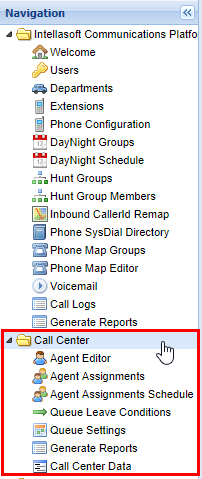
Welcome to the **IntellaQueue** documentation space. This space is dedicated to organizations that are running a call center style phone system and have our IntellaQueue product licensed. Here you will find detailed instructions on how to add and manage Agents, Queue, and powerful **Report Generation.**  Similar to the [**Core Web Portal**](https://public.intellasoft.net/books/web-portal-dL9/page/getting-started)[ ](https://doc.intellasoft.net/display/intellacore/Core+Web+Portal+Documentation)each space represents a **screen** within the IntellaSoft Web Portal, and can be accessed from the **Navigation Panel**. The IntellaQueue components are typically contained within a collapsible folder called Call Center in the web portal, as shown below.

For more advanced system customization see:

<div class="columnMacro conf-macro output-block" data-hasbody="true" data-macro-name="column" id="bkmrk-agent-editor%C2%A0for-add">- **[Agent Editor](https://public.intellasoft.net/books/intellaqueue-nQF/page/agent-editor)** for adding and removing **Agents,** as well as setting **Agent** login information
- **[Agent Assignments](https://public.intellasoft.net/books/intellaqueue-nQF/page/agent-assignments)** for add/removing **Agents** to **Queues,** and vice versa (associating agents with **Queues)**
- **[Agent Assignments Schedule](https://public.intellasoft.net/books/intellaqueue-nQF/page/agent-assignments-schedule)** for configuring **Queue** parameters for **Agents**
- **[Queue Leave Conditions](https://public.intellasoft.net/books/intellaqueue-nQF/page/queue-leave-conditions)** for configuring parameters for **Agents** to be removed Queues (such as when no callers are waiting/incoming)
- **[Queue Settings](https://public.intellasoft.net/books/intellaqueue-nQF/page/queue-settings)** for adding new **Queues** and configuring basic settings for said **Queues**
- **[Generate Reports](https://public.intellasoft.net/books/intellaqueue-nQF/chapter/generate-reports-intellaqueue)** powerful report generation gathered from **Agent** and **Queue** calls.
- [**Call Center Data**](https://public.intellasoft.net/books/intellaqueue-nQF/page/call-center-data) contains data about calls made to and from **Queues** in a hierarchical format.

</div>[![image.png](https://public.intellasoft.net/uploads/images/gallery/2024-07/scaled-1680-/WwQimage.png)](https://public.intellasoft.net/uploads/images/gallery/2024-07/WwQimage.png)

# Call Center Data

We are rebuilding this page. Stay tuned for updates!

<div class="wiki-content" id="bkmrk-"></div>

# Installation

## How to Install IntellaQueue PC Toolbar

1\) Download the [application](https://ssl.intellasoft.net/software/intellaToolbar/intellaQueue-setup.exe).

2\) Open your downloads folder

3\) Run `intellaQueue-setup.exe`

4\) On the IntellaQueue pop-up, hit the install button

5\) On the next page check the accept checkbox and let the installation run

6\) When this is done, you will have this desktop icon. Run it

7\) Once you run it, you will be prompted with the Database Settings Window

8\) Click Connect

9\) Replace `cxxxxx` with your client ID, including the c

10\) Replace `yyy` with the desired extension

11\) Replace `zzzz` with the Agent Number set in the agent editor

12\) Press login

## Web Toolbar Login

1\) Go to [https://toolbar.intellasoft.net/](https://toolbar.intellasoft.net/)

<figure class="image" id="bkmrk--10"></figure>2\) Enter the user’s Extension (Client ID-Extension Number), Agent Number, and Agent Pin

3\) This will bring the agent toolbar up, where the user needs to hit the login button

<figure class="image" id="bkmrk--11"></figure>